10-Year old SMPS design still an excellent performer
I have been using the CONNEX ELECTRONIC Switch Mode power supply for almost 10 years [link]. Chose this power supply solely based on the theory that it would be a low noise, and suitable for audio applications.
A recent review in ASR describes a TPA-based amplifier, the JLE Sylph-D200 amplifier module, is powered by the single-voltage version of this same power supply [link]. The amplifier can achieve a SINAD number of 95 dB
Here is a photo of the Power Supply from Connexelectronic [link]:
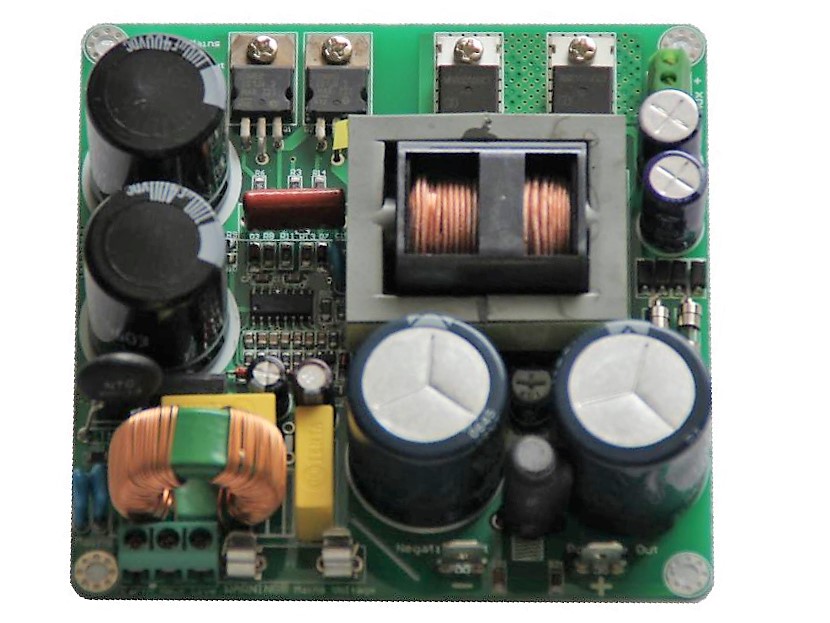
Here is a photo of the power supply from the ASR site:

And here is the Connex SMPS300RE dual polarity power supply that I’ve been using:

You can purchase Connex SMPS directly from the manufacturer, but if you are in the US, purchasing from HIFIMEDIY may be a better option [link]

New Review and In-Depth Analysis of Hypex UCD-180HG
ASR has a new review of this Amp module [link]
Hypex UcD180HG HxR module is an older class D circuit solution which cannot compete in distortion parameters with Ncore or Purifi, however it has several very interesting features. It is a simple circuit, price is about 1/3 of NC400, it has frequency response independent of load impedance and nonlinearity almost independent of frequency. These are features I appreciate much and I have to say I like this module.
Here is my post on this amp [link]. Almost 9 years ago.

The author compares the Hypex amp with a highly popular amp, the AIYIMA 07 which is based on the TI TPA-3255 and can be purchased for about $75 with a power supply. The AIYIMA has also been reviewed at ASR [link]
We can see that AIYIMA has higher distortion which is much more modulated by speaker complex impedance. So it goes, 1kHz 5W SINAD is not everything and worse, it is a bad measure to compare amplifiers.
The distortion numbers are AIYIMA: 0.012 and Hypex: 0.0047% Note also that the measurements are at 5W and the “standard” is at 1W. The author also compares the frequency response and notes the effect of speaker load on the response. In fact, I would prefer the AIYIMA since with age one looses high frequency sensitivity.

The author summarized all his findings comparing the UCD-180HG based amp vs the AIYIMA TPA-3255 based amp in this post [link]
So the main difference remains in frequency response affected by class D amplifier circuit topology. UcD has flat response independent of load, A07 response is load dependent. Might be noted that UcD distortion is also less affected by load and frequency. Might be also noted that none of these features we may read from SINAD 1kHz 5W 4ohm comparative chart.
I am also a fan of the UCD modules. After 10 years, this technology remains competitive in performance and even more in reliability and durability. The people behind UCD (Hypex) were pioneers in class D amplification and continue to produce state of the art audio amplifiers.
This review and analysis also show that 10 years later, high performance audio amplifiers can be had for very little money. A finished AIYIMA amplifier with power supply can be purchased for $75, a fraction of what a UCD-based amp would cost
You can read more about UCD in the IEEE Spectrum article: “The Consumer Electronics Hall of Fame: Philips UcD Audio Amplifier“
Alpair 12p In Cabinets
Previous posts on Alpair 12p: https://hifiduino.wordpress.com/2013/02/02/markaudio-alpair-speaker-drivers/
I purchased from diyaudio: https://www.diyaudio.com/forums/swap-meet/227550-fs-cabinets-mark-audio-12p-monitors-quilted-maple.html many years ago. Lately I have set them up for near field listening on my work desk while working from home. Using a TOPPING DAC [link] and an AIYIMA amp [link]. Nowadays you can get superb electronics for little money. There is no longer any incentive for DIY electronics 🙂
All photos from diyaudio and audiokarma
Baltic Birch plywood construction
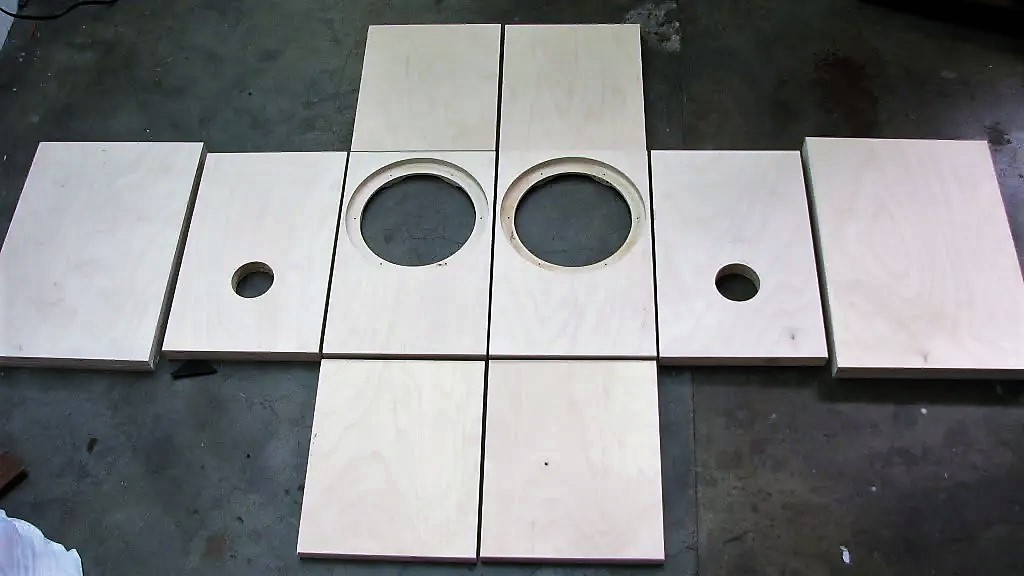
Cabinet dimensions
- Front and back baffle are 1″ thick
- Top and bottom are 3/4″ think
- Sides are 5/8″ thick
- 15 1/8″ tall
- 10 3/4″ deep
- 9 15/16″ wide
- Internal volume: 0.6 cu ft
- Port dimensions are 2″ wide by 3 3/8″ long tuning the cabinet to 55hz
- Inset area for driver is 8 1/8″ (close to 8 3/32″) in diameter and 1/2″ deep
- The hole for the driver is 6 5/8″ diameter
- No internal bracing has been used due to the small dimensions
The cabinet internal dimensions are the same as the “vented box – stand mount” cabinet plans from Mark Audio [link]. If we calculate the internal dimensions (taking into account the thickness of the different sides) We get:
- Width = 9 15/16 – 2×5/8 = 8 11/6 = 221 mm. MarkAudio plan: 218 mm
- Depth: 10 3/4 – 2×1 = 8 3/4 = 222 mm. MarkAudio plan: 218 mm
- Height: 15 1/8 – 2×3/4 = 13 5/8 = 346 mm. MarkAudio plan: 345 mm
- Volume: 17 liters = 0.6 cubic-feet. MarkAudio plan: 16.4 liters = 0.58 cubic-feet
Special features
Quilted Maple veneer. Often used for guitar finishes

The veneer is finished with several coats of sanding sealer followed by several of Birchwood Casey gunstock oil. 4 coats were applied with a cloth and each coat rubbed with a a steel wool after waiting 2 hours. A forum member commented that applying an additional 4 layers, it would be “glass smooth”
Internal chamfer for increased air flow (not sure how useful is this feature, but it is a very nice detail)
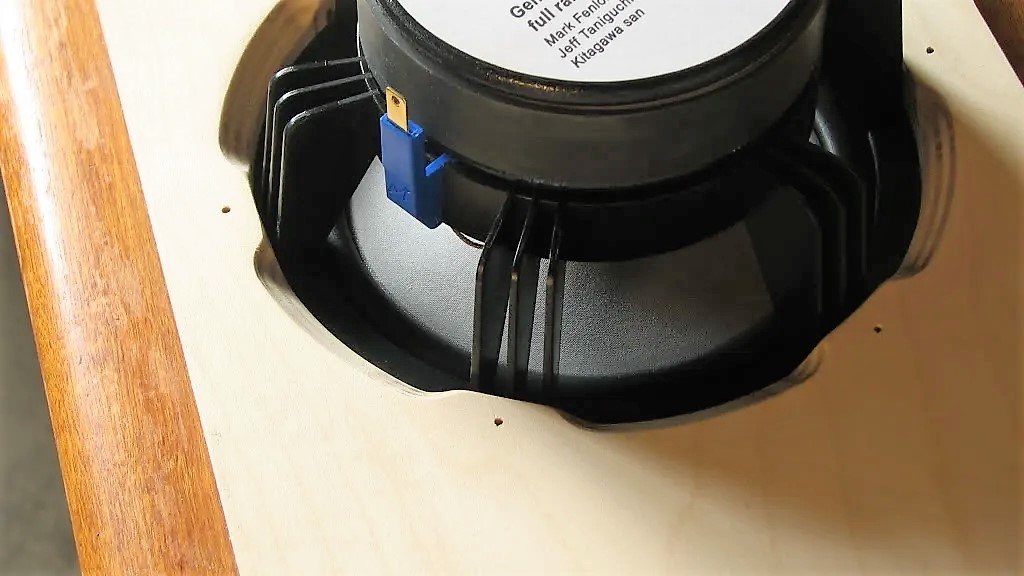
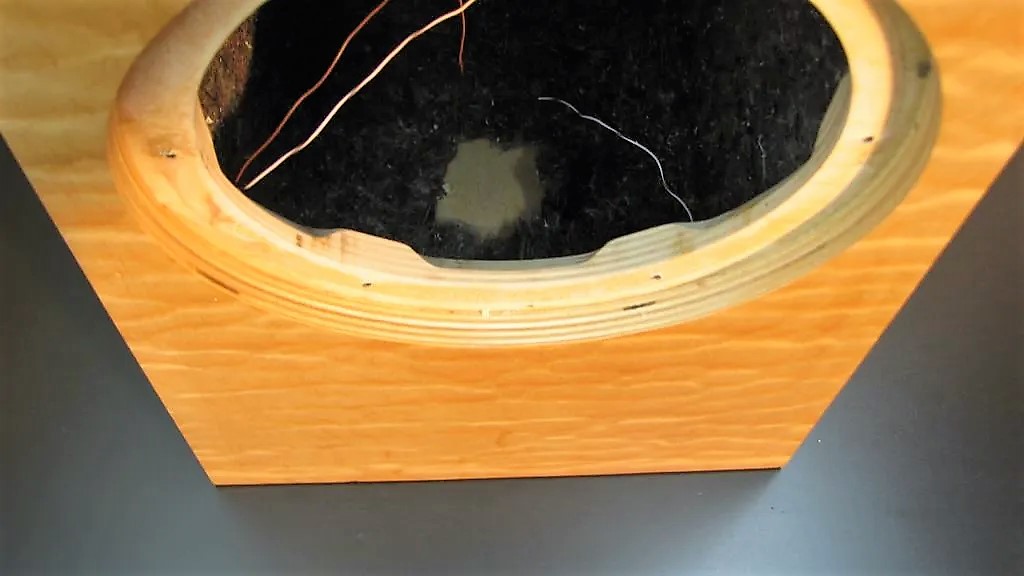
The speaker connections on the back only accept banana plugs and are press fit into the cabinet for a low profile connection. Internal cabling is a single strand of Cat 5 wire per pole.

Construction Details

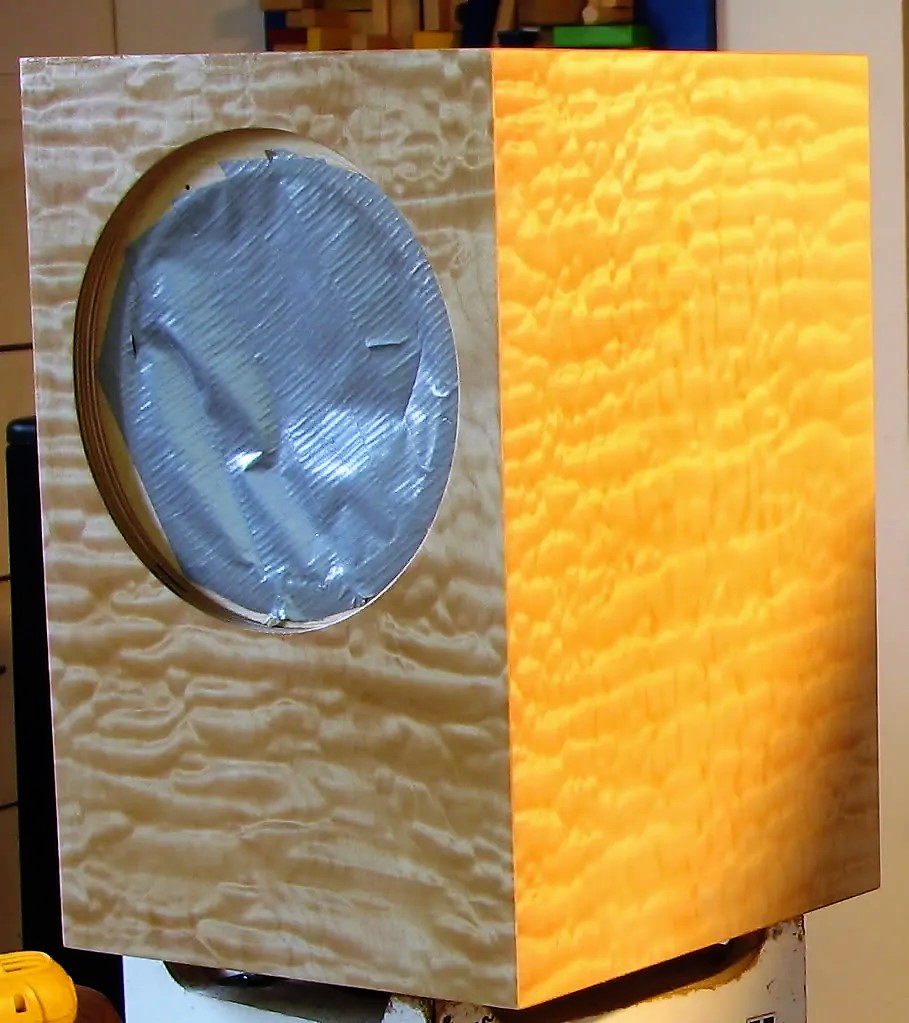
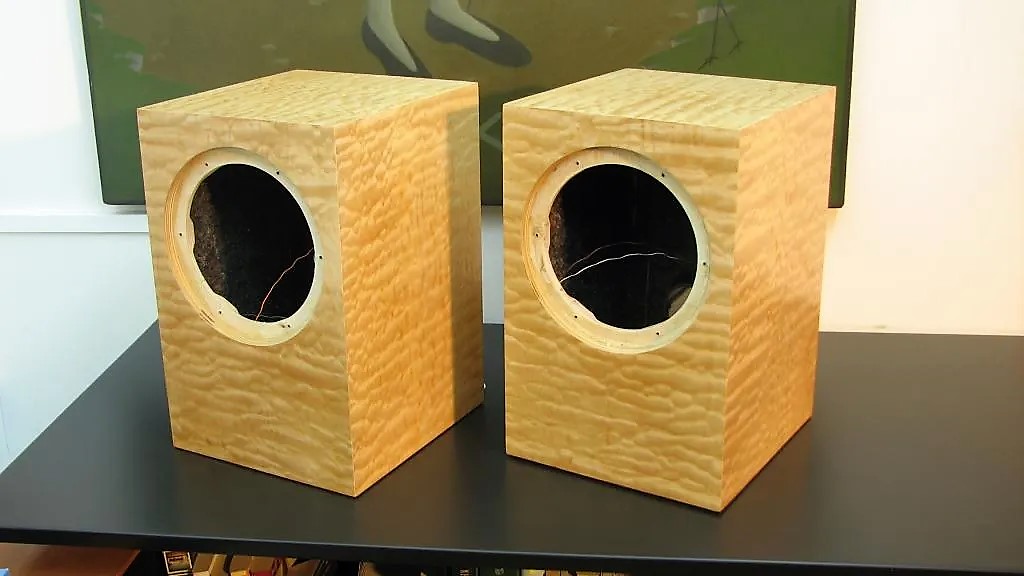

Finished Speaker

Reviews of the Alpair 12p
In my listening environment (near-field on work desk), they sound very nice. For my taste, I feel there is some lacking of treble, but the drivers are pretty flat to 20KHz. Perhaps I am loosing high frequency sensitivity. Bass is good and can be enhanced with a larger cabinet, but for this listening position, it is sufficient for my taste. I have thought of using a tweeter to augment the treble but I’ve yet to find anyone in the forums with a good recommendation on which tweeter driver to use and how to integrate. Adding a tweeter seems to come with a lot of side effects.
With near field, listening distance, speaker toe-in and height alignment of your ear with the driver makes a difference (seems obvious)
Review of Alpair 12p in Super Pensil cabinet [link]
So how to they sound? In a word, fantastic! My first impressions are that they are all I could have hoped for. Terrific imaging with wonderful resolution and separation between instruments. Bass is very taut and more than adequate, at least with these types of recordings. I haven’t pushed them with any Zeppelin or Floyd yet, so how they hold up to those demands is yet to be seen. But I really built them for jazz and vocals. I have my modded Klipsch Forte II’s for the heavier stuff, if needed!
Review with small enclosure (similar to the one shown here) [link]
So, how do they sound so far? They have bags of low level detail, a wide, deep soundstage and a crisp, musical and tuneful presentation. Bass isn’t room shaking but it is tuneful, rythmic and not boomy. I’ve been listening to mainly to vinyl- records that I haven’t played for ages and I’m happily letting it run through both sides just enjoying the music.
Review with tall enclosure (Avebury) [link]
Okay, been playing like 150 hours now, and started introducing them to a wider spectrum of music, I started noticing sounds and things, and I start to understand why people are saying that they are unforgiving, one of my favorite tracks is ruined now, as I was able to hear that the guitar sample they use through the whole song must have been from a dirty vinyl, and they repeat the sample for every six seconds or so (afu ra – warfare)
Also been listening a lot to ottmar liebert as it was suggested for running the speakers in with on a other thread, and boy here the speakers really comes to life, set at the right volume and closed eyes, I will be in doubt if there is a guitarist in my room.
Review with open baffle [link]
Enter Full Range, but not in a box…..in an open baffle. After a lot of research, I settled on the Mark Audio Alpair 12P. I had no idea how this would turn out….but what the hell………
My experience from listening to FR speakers in the past was not good. Lack of treble was most noticeable, and the units with whizzer cones sounded brittle to me.
So, the Alpairs have a 500 hour run-in time, and they changed noticeably in the coming weeks. I became more and more impressed as they opened up. I thought to myself ……who needs a tweeter?
Another review with open baffle [link]
My fears from the past would be the roll-off or brittle sounding treble….but no, treble was fine even at this early stage of run-in (they take 800 hours to come fully on song). The mids were clear, dynamic & detailed. I cant comment on the bass as this was being handled by the active 18” woofer now driven by a PA amp form the Behringer stable, an iNuke NU3000DSP. This unit has built in crossover & PEQ.
The imaging on these babies was also in a different league.
Firmware v 0.99
The long awaited firmware update for the Soekris DAC is out.
| Parameter |
Firmware 0.9 |
Firmware 0.99 [link] [link] |
| Digital Filters FIR1 Coefficient Size and Format | FIR1: 32 bit, 2.30 format
FIR2: 32 bit, 2.30 format |
FIR1: 32 bit, 1.31 format (one bit of increased precision).
Should be good down to around -150 db. Increased precision improves frequency response (pass band ripple and stop band attenuation) [link] -One extra bit of precision adds 6 db improvement. FIR2 format remains the same. |
| Digital Filters FIR1 Number of Coefficients | 1016 max coefficients | Twice the number of coefficients resulting in 2032 max coefficients. Basically anything possible with software resampler (such as SOX) will be possible in the DAC. |
| Digital Filters FIR1 and FIR2 Filter selection | A single filter per supported sample rate. Changing filters requires uploading the new filters through the serial interface. To switch to the new filters a power cycle, input switch or sample rate change is required. | 4 banks or FIR1 and corresponding FIR2 filters per supported sample rate can be individually selected. (FIR1 filters specified as type 4-7 corresponding to banks 1-4 and FIR2 filters specified as type 8-11 corresponding to banks 1-4). NOTE: For simplicity in creating filters: if a specific FIR1/FIR2 filters are only specified once for bank 1 (FIR1 type 4 and FIR2 type 8), then they are used for the other banks e.g.: [link]
The factory filters are: Linear, Mixed, Minimum and Soft. As before, new filters can be uploaded replacing the factory filters. Example filter configuration: [link] A filter bank can be selected by selecting the FIR1 type (4-7) or name given to the filter. The corresponding FIR2 filter in the bank is automatically selected. A power cycle, input switch or sample rate change is first required when uploading new set of filters. |
| De-emphasis Filter | “Original” | “Improved”. Note: de-emphasis filters are always loaded, but only enabled when emphasis bit is set in spdif datastream [link]. If a CD is ripped, then the emphasis bit is lost. It is up to the ripping s/w to detect the emphasis bit and apply de-emphasis when ripping. Apparently only iTunes can do this automatically: [link], [link] |
| Digital volume control | -99 dB to 0 dB | -80 dB to 10 dB with zero crossing detect (to eliminate glitches during volume level transitions). Also fixed the polarity inversion bug [link], [link] |
| Locking to incoming data bitclock and wordclock | > 1 sec (up to 2-3 sec). This happens when the incoming bitclock and/or wordclock is interrupted or changes frequency when changing tracks | < 0.2 sec, near instantaneous. Locking pops [link] initially present in the first release of the new firmware have also been fixed (same version number) |
| Interrupt-driven Serial Port | No | Yes. This prevents loosing characters at high speed (prevents the DAC from loosing characters when a computer or microprocessor sends commands to the DAC at high speed) |
| Input selection | Auto, SPDIF 1, SPDIF 2, I2S (although it does not quite work) | Same: Auto, SPDIF 1, SPDIF 2, I2S (bugs fixed) |
| Isolated 3.3V Serial ports | Not enabled | Enabled. Can be used to interface to uP like Arduino or Raspberry Pi for external s/w control without having to use a serial to RS232 converter device [link] |
| Output Mode | Stereo only | Normal Stereo, Inverted Stereo, Mono Left, Mono Right. In Mono, the raw output is also in balanced mode.
For multiple boards, the plan is “to daisy chain the serial ports, the echo of all commands should make it possible. Then use volume pot and input selector on the first one in the chain… Paralleling the I2S and Toslink inputs are easy, SPDIF might require buffering…” However, perhaps a better solution is to use separate serial ports to control each board (if for only setting one board MONO Left and the other MONO Right). An Arduino Mega or DUE has multiple serial ports. |
| Activate newly uploaded firmware or filters | Power cycle | In uManager, after download type “update” and then type “exit” to exit the uManager (and return to “play” mode). “update” should only be used to update the firmware because it erases and rewrites the uC internal flash which is a high risk process. [link]. I believe power cycle will do the same thing (but didn’t try) |
NOTES
- Input rate of 352.8K or 384K will result in FIR1 being bypassed [link]
- uManager settings (filter, volume, etc) are stored in flash and survive power cycling. This is used to setup power-on default settings.
- In uManger, “set filter =…” should be “set filters = …”
Updates to Firmware:
1.05 filters are the same as 0.99 filters, only added support for DSD rates which require their own filter definitions. The filter files are interchangeable, but for DSD to work you of course need the DSD filters….
1.05 had bugs which in certain circumstances could cause the dam1021 uC to lock up, that should be fixed in 1.06. Any other versions was test versions and should be gone by now…. [link]
COMMAND INTERFACE
| Area | Play-mode Command interface |
Setting Command interface (uManager) |
Comments |
| Best Usage | Microprocessor Control | Setting power-on defaults, interactive control | Settings with uManager are saved to flash and survive power cycle. Note the use of capital letters when using “play-mode” interface |
| Input Selection | Ix | set input = x | x=0: I2S Input
x=1: SPDIF 1 (typically coax) x=2: SPDIF 2 (typically toslink) x=3: auto. It locks to the first detected active input in the order I0, I1, I2 |
| Volume Control | Vxx | set volume = xx | Sets volume to xx level in dB. xx = -80 to +10 |
| V-99 | set volume = -99 | Enables potentiometer volume control. NOTE: If set to other than -99 and the potentiometer is connected, the DAC may be MUTED (having no output whatsoever and unresponsive to the volume pot) -at least this was the behavior in the older firmware. | |
| Show Filters | N/A | filters [all] | Show current selected filter (“filters”). Show all possible filters (“filters all”) |
| Switching filter bank | Fx | set filters = “name” | Select filter bank with immediate effect. Both FIR1 and FIR2 filters in the bank are selected. [link].
x=4-7 representing filter banks 1, 2, 3 and 4. “name” is “linear”, “mixed”, “minimum”, and “soft” are are mapped to filter banks 1, 2, 3 and 4 regardless of what type of filters you have in those banks. [link]. Note: although “set filters” can be used to select filters, is meant for setting the default filter. At power up, the DAC is always at the default filter |
| Other Commnads | N/A | See –> | Enter/Exit uManager: “+++” to enter; “exit” to exit
Set serial communication speed: “conspeed=xxx“. I think only use if having problems with the highest speed: 115200 Set mono/stereo: “mode=x“. x=”normal”, “invert”, “bal-right”, “bal-left”: Normal STEREO, Inverted STEREO, MONO Left, MONO Right. In MONO, the raw output is also in balanced mode. Update firmware (not to be used when uploading new filters): “update“. NOTE: “update” should only be used to update the firmware because it erases and rewrites the uC internal flash which is a high risk process. |
UPLOADING THE NEW FIRMWARE
Summary of steps:
Connect DAC RS232 port to RS232 port in PC
- Start the terminal application and configure the serial port parameters
- Enter DAC uManager by typing “+++”
- Type “download” and use the terminal application Xmodem transfer facility to upload file
- Type “update”, then acknowledge update with “y” (yes) – Caution: Don’t use “udpate” when just uploading filters
- Type “exit”
Connect the RS232 Interface to a PC
Since this is the first time the isolated serial ports have been enabled, the existing firmware in the DAC can only communicate via the RS232 ports.
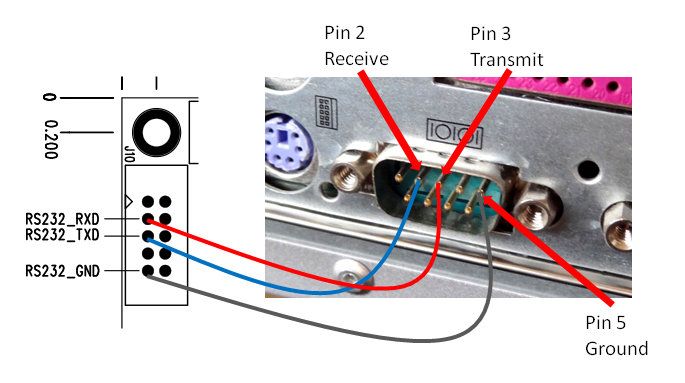
Connect the RS232 pins to the PC serial port as follows. This is basically a null-modem connection without h/w flow control. You may want to check this informative site on serial communications including RS232 [link]
Launch the Terminal Application
I use “Tera Term” [link]. The latest version is 4.87 and it works well with Windows 10. A mini tutorial can be found here [link].
Select “Serial” connection upon startup of the application. Configure the serial communication parameters with the following settings by selecting “Serial port” in the “Setup” menu:
- Baud rate: 115,200 (This is pretty fast. Use a good, short cable)
- Data bits: 8
- Stop bits: 1
- Parity: none
- Flow control: none

Invoking “uManager”
- Type “+++”
Wait for the DAC to respond (~1 sec). You will see the following message:

Uploading the new firmware
- Type “download” in the terminal window.
uManager will respond with “Start sending file using XMODEM/CRC protocol” and wait for you to start the xmodem transfer.
- In the terminal application “File” pull down menu select “Transfer” -> “Xmodem” -> “Send” from the File menu. Select the file and click “Open”.

Transfer will start immediately:

- Type “update” and then “y” to the prompt “uManager Firmware Update, are you sure?”
- CAUTION: Some users have reported that “update” when just updating filters have bricked the DAC. This is because “The update command should only be used when loading new firmware, it erases and rewrites the uC internal flash which is a high risk process, and if something goes wrong it would require hardware to fix it” [link]

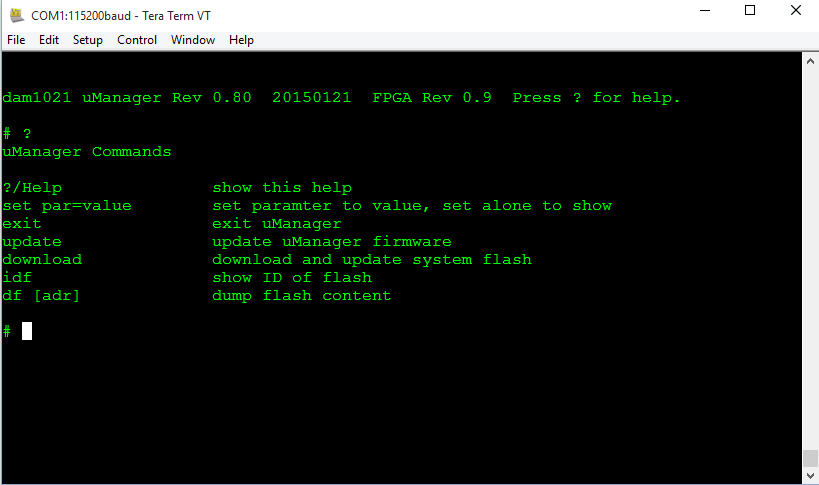
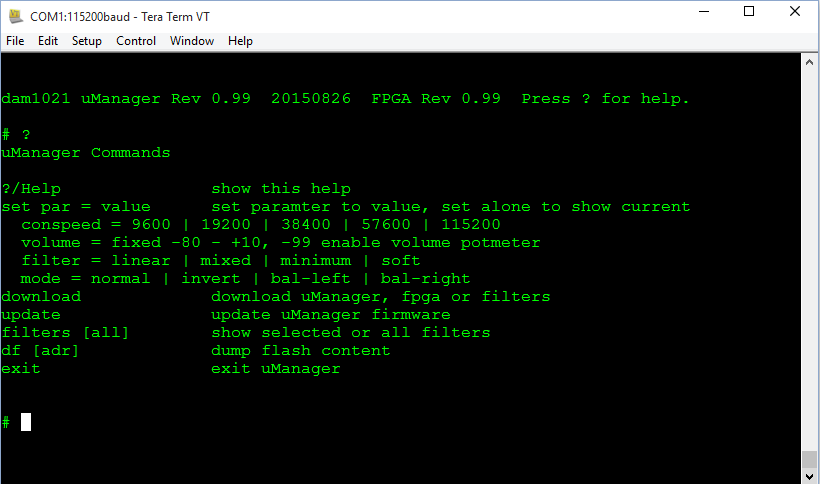
Comparison between uManager 0.8 and 0.99:
RELOADING FIRMWARE IN A BRICKED DAC
Our friend Paul has details on reloading the firmware without uManager (in case you crash/corrupt the firmware and can’t get uManager to work) [link], [link]
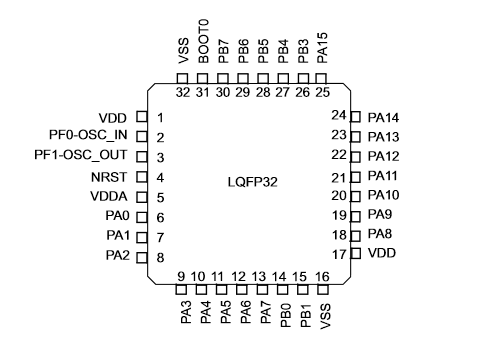
The firmware resides on the onboard microprocessor which is is the STM32F030 uC [link].
The pin out of the microprocessor is the following (from datasheet [link])
Programming is through the “SWD” pins (from application note AN4325 [link]):

PA13 and PA14 are pins 23 and 24 (lower left corner of the chip)

If you follow the traces, you can see where they are connected in J4:
Requirements:
- Get a hold of a ST-LINK/V2. [link] This is a programmer for STM32 (the microprocessor in the DAC board)
- Download ST-LINK utility [link] and user’s manual
- Email Soren and ask for a copy of the uManger firmware (also available from Paul’s website -the link above)
Connecting programmer to DAC board
The Pin definition of the ST-LINK is as follows (from user guide [link]):
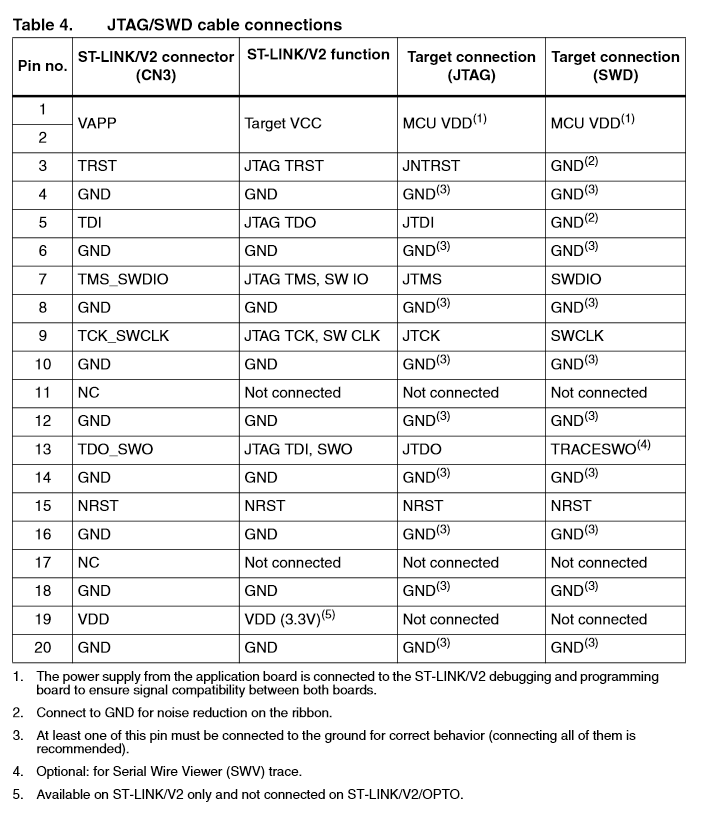
Since the target connection is SWD, we look at the last column and determine that only 5 pins need to be connected:
- Pin 1 or 2: MCU VDD (the VDD of the microprocessor – requires that the DAC board be powered on -also see Note 1 in the table above)
- Pin 20 (0r any GND): GND
- Pin 7: SWDIO
- Pin 9: SWCLK
- NRST (Reset) -This is pin 4 of the microprocessor, not sure if connected to J4

Flashing the firmware
- Select “Erase Chip” to erase the flash in the microprocessor to ensure clean flashing
- Select “Program” or “Program and Verify” and select the uManger bin file (Section 3.5 of the manual)

Soekris DAC: Modding VRef
MUST DO MOD?
As it turned out, the implementation of the 4V reference voltage in the Soekris DAC has been found to be sub-optimal. Fortunately, thanks to experiments and measurements by industrious individuals of the audio diy community, Soren, the designer of the DAC, has reviewed the design and has proposed an official “factory” mod which is fairly easy to do.
Thus this “mod” seems to be a “must do” in order to achieve the intended designed performance of the DAC, but to many that have been already satisfied with the sonic signature of the DAC, this mod would definitely improve the enjoyment department.
4V (and -4V) REFERENCE
Shift Registers
In the Soekris DAC, there are 16 LVC595A shift registers (chip markings indicate that it is an NXP LVC595A [link]).

The diagram below depicts the pin description. We are interested in finding out how Vref is related to the shift register.
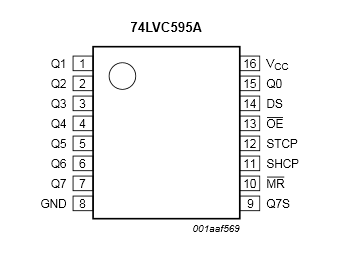
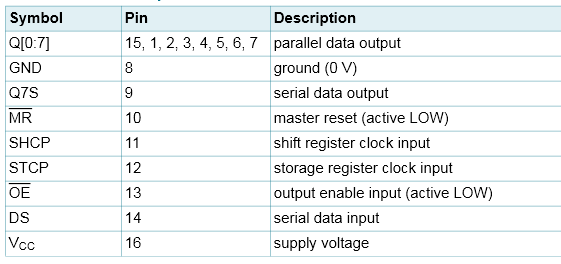
A shift register outputs will be either VLow (0V) or VHigh (VCC) in accordance to the serial data input and clock. Q0 to Q7 are the outputs of the device.
According to these posts [link], [link], the shift registers provide the voltage source to the resistor ladder. These devices “drive” the resistor ladder to convert the digital signal into an analog signal. In order to further understand this concept, lets look at the basic configuration for an R-2R DAC network show below:
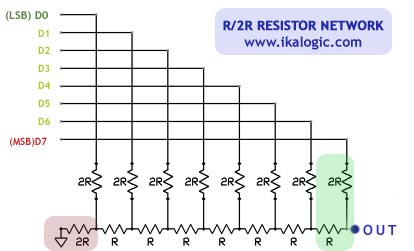
For this 8-bit example, D0 – D7 are the 8-bit digital value to be converted to an analog output and can have two values: VLow, representing the digital value “0”); and VHigh, representing the digital value “1”. In a typical implementation, VLow = 0V and VHigh = Reference Voltage
It can be seen from the circuit diagram that for a “0” input (VLow), the output is “0” and for a “1” input (VHigh) the output will be some fraction of the Reference Voltage determined by the equivalent resistor divider connected to that particular input. In the Soekris DAC, the outputs of the shift registers are connected to the inputs of the resistor ladder as shown in the following photo:

We can therefore see that the reference voltage is the VCC of the shift register. It follows that in the Soekris DAC the quality of the VCC is perhaps the single most important factor affecting the quality of the output signal because this voltage is directly applied to the resistors in the ladder.
Improving Vref
In most DACs, the quality of Vref is directly related to the quality of the output signal. In terms of measurements, this is expressed in the THD numbers.
As an example, the datasheet of the new AKM 4490Q DAC, shows that improvements to the Vref can be accomplished by adding capacitance to that pin. The datasheet shows a THD measurement diagram with increasing values of capacitance applied reference voltage pin:
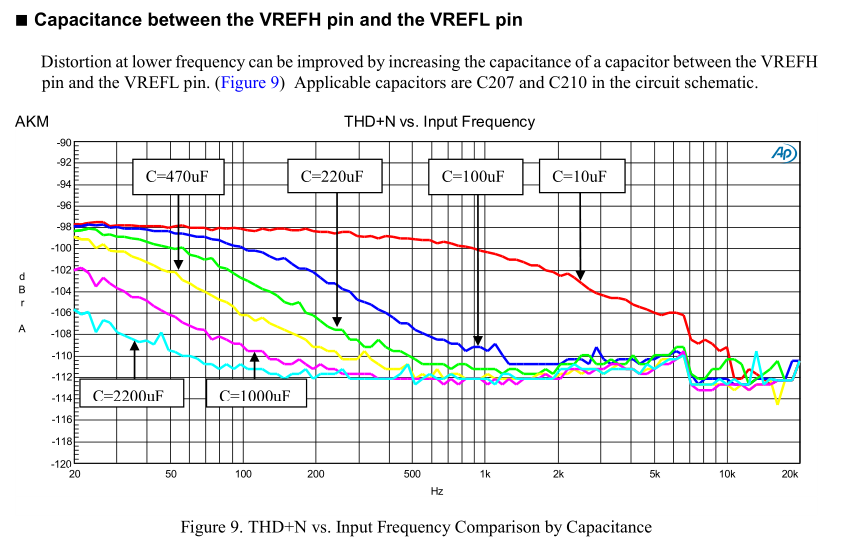
Notice that continuous improvement to the THD performance is obtained with increasing capacitance. Even if using more than 2200 uF.
It follows that one can safely assume that increased performance in the Soekris DAC can be had by using large value capacitors to bypass the reference voltage.
Indeed, power supply mods and experiments shared by “alecm” at the diyaudio forum shows both audible and measured improvements when Vref is bypassed with a large size capacitor. In fact, “alecm” showed that the reference voltage is far from clean and that it exhibits a fairly large ripple modulated by the input signal [link]. The maximum ripple was measured at 6mV (0.15% out of 4V). We can see that this is 3X the deviation contributed by the lowest grade resistors which is 0.05%
The following traces (borrowed from the diyaudio forum post) show the before and after mod comparison of the reference voltage Vref.
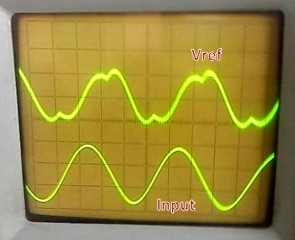

In the words (paraphrased) of alecm, the mods provided:
- Deeper soundstage
- Greatly increased dynamics
- Increase in resolution and details
Implementing the mod
To facilitate modding, Soren provided the location of the output capacitors for the +/- 4V references and their polarity markings [link]:

Soren has also provided some recommendations [link]:
- The Vref buffer design are unconditional stable with large capacitance, so you can hang on as much as you want, but 220uF to 470 uF low ESR / polymer on each of the four Vref supplies is a good choice.
- It’s unnecessary to add multiple smaller capacitors as the PCB have power planes with smaller ceramics at each ‘595 shift registers
- You can also get 47uF X5R 6V3 ceramics in 0805 size, easy to stack on top of existing capacitors….
- Please don’t try external Vref supplies, they’re not needed and the risk to ruin your board is great.
Because Vref has been designed to be stable with “as much capacitance as you like”, I will implement this mod by adding capacitors at each VCC pin in order to increase the capacitance and also for the fun of it.
If we follow the polarity of the +4Vref and of the -4Vref to each shift registers, we find the following:
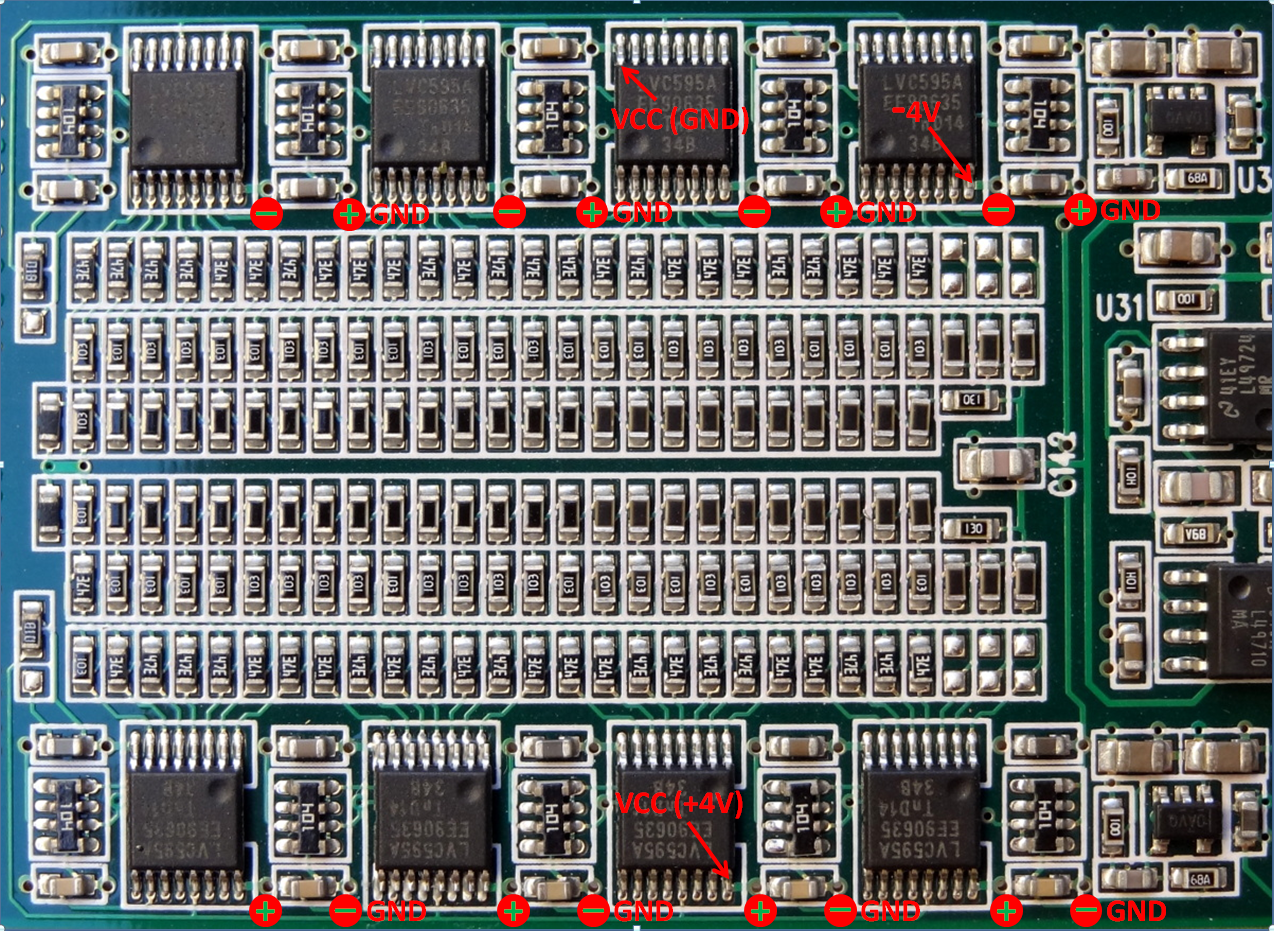
Notice that for the bottom row, the VCC pin of the shift register is connected to +4Vref, and this is where I will install the larger capacitor. In the upper row, the VCC pin of the shift register is connected to GND. Assuming a solid ground pin, there is no need to install a capacitor here. Instead, the ground pin of the shift register is connected to the -4Vref. Here I will install the larger capacitor. The photo above shows one channel of the board. The other channel is built exactly the same.
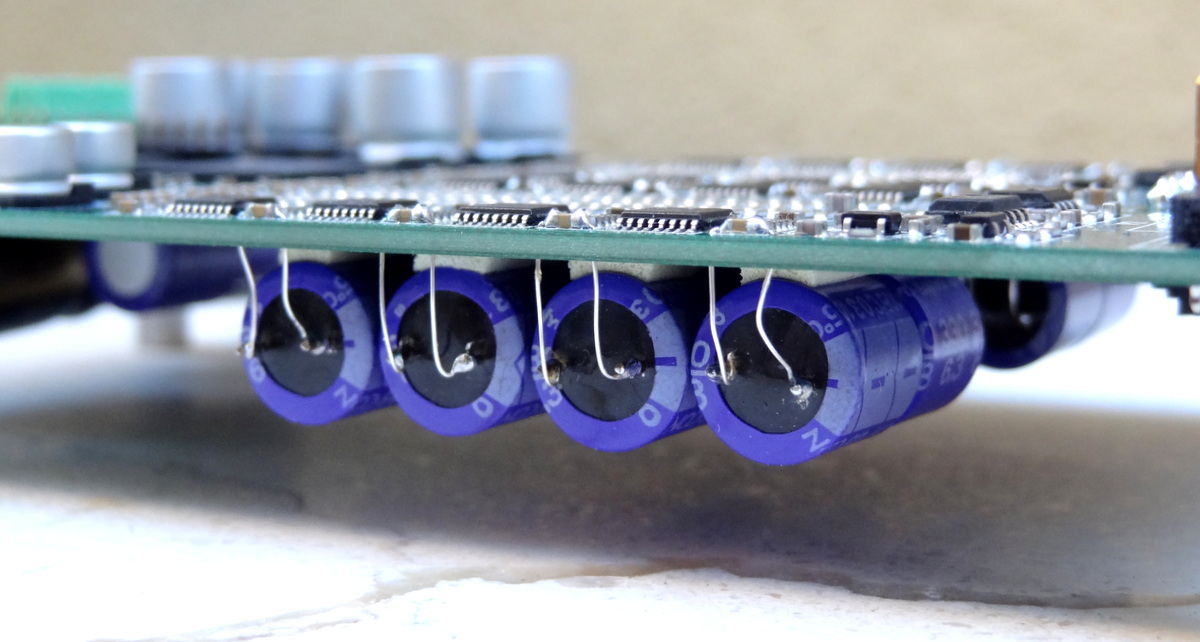
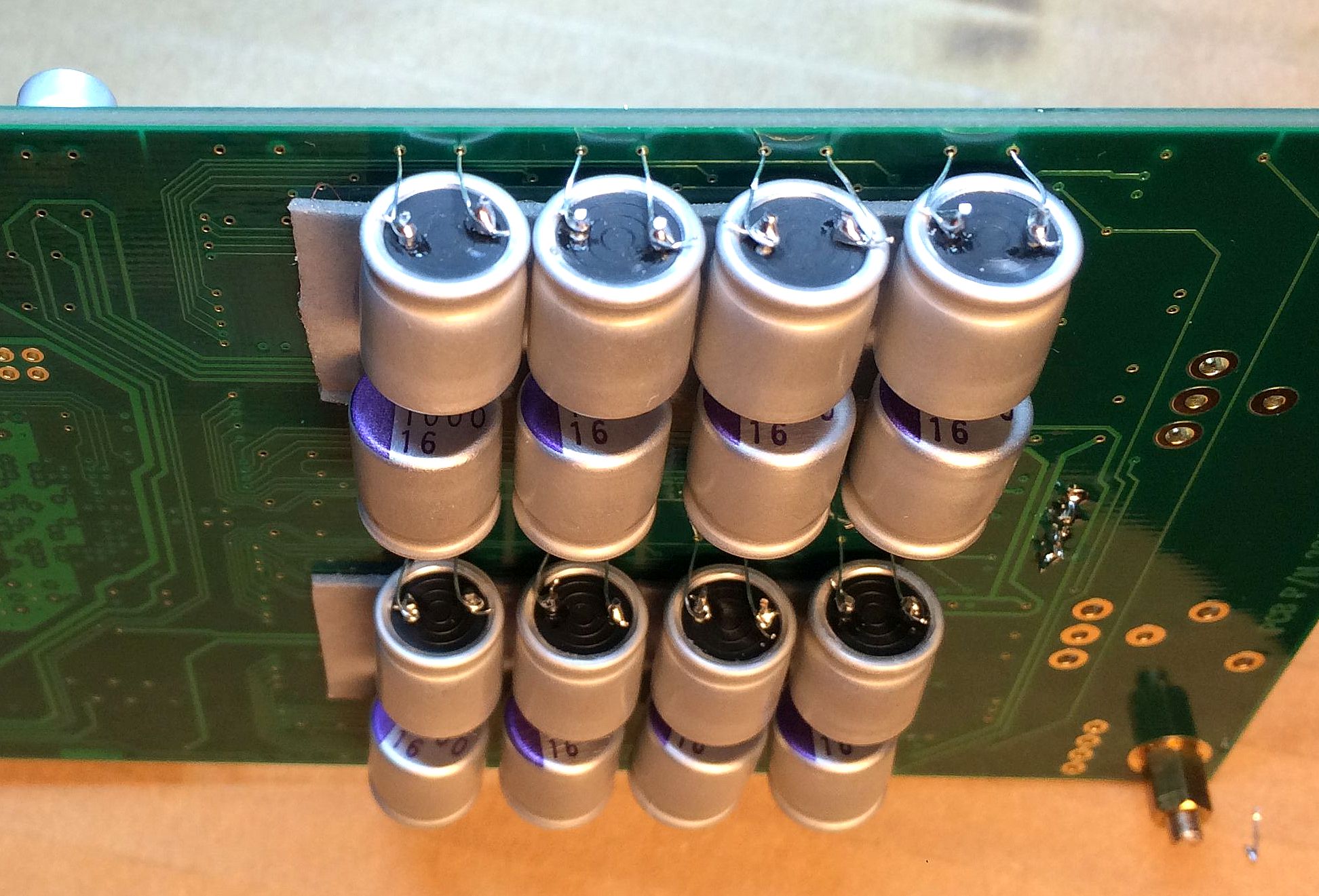
I have a number of 330 uF, 6.3V OSCONs that I picked up from industrial surplus. These have the leads cut (I think) for automated board stuffing. To solder them to the VCC capacitors, I need to extend their leads. More on the OSCONs here [link]

TIP: In the past I had piggybacked electrolytic capacitors on top of the ceramic capacitors and with just a slight bump to the electrolytic, you can inadvertently detach the ceramic capacitor from the board [link] -so you must be extra careful if using this method.
The extension wires are thin enough to fit through the power and GND vias. This way I can glue the capacitors to the back side of the board and bring the leads to the front side through the vias. I used some thin insulated wire (after stripping the insulation). I don’t know what gauge but they fit both the small vias (output capacitor of Vref buffer) and large vias (shift register’s VCC capacitor). You can also use the single strands from stranded wiring.

I used double stick tape to glue the capacitor to the backside of the board. You can also use a hot glue gun to affix the capacitors.

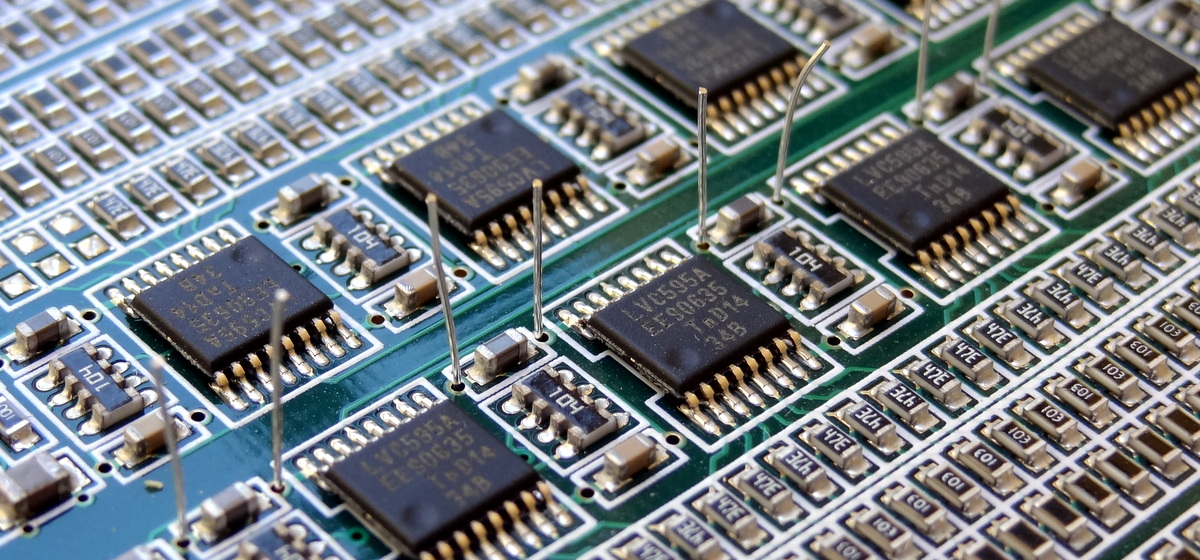
Bending the wires closer and in contact with the ceramic capacitor to facilitate soldering. Actually I measured continuity and the wires already make contact through the vias. I don’t think it is possible to solder the wires to just the vias, surface tension and solder mask may prevent good flow and contact.

Add flux (this is a must to allow the solder to quickly flow to the intended location):
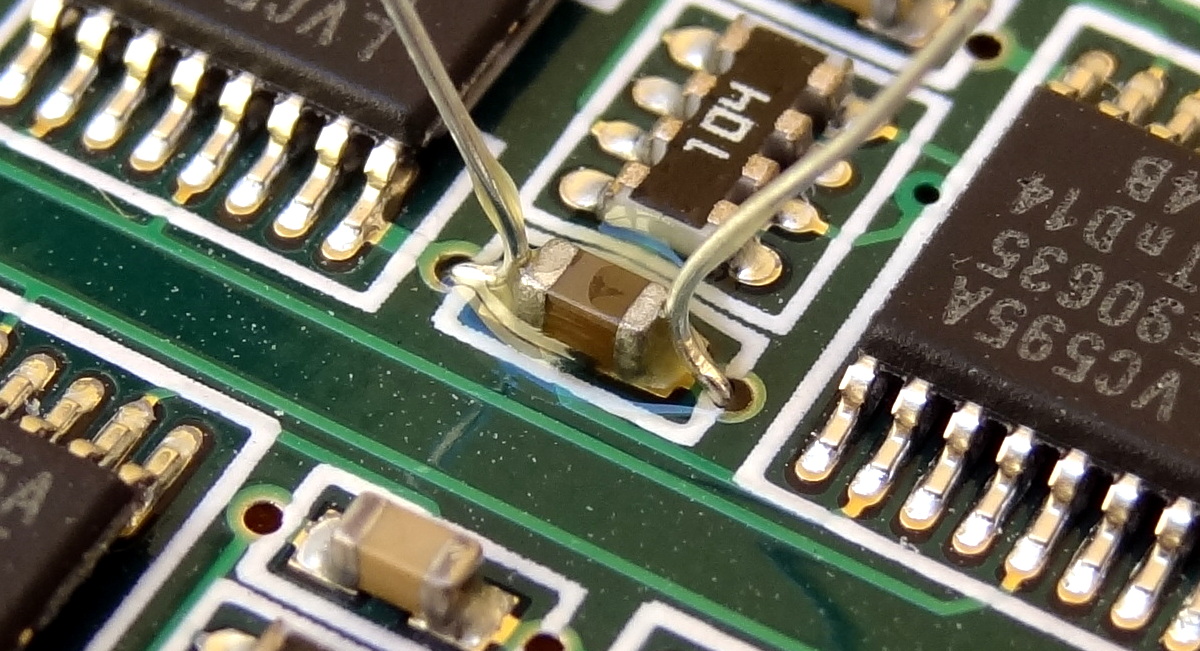
And carefully solder the wires to the ceramic capacitors (practice with an old board if you are new to soldering SMD devices). Thin gauge leaded solder works best. There maybe some appeal for lead-free or silver loaded solder but those are harder to work with – not compatible with amateurs like us. Just wash your hands well afterwards 🙂


To get professional results, I use Isopropyl alcohol (rubbing alcohol) with an old toothbrush to clean up the flux afterwards.

Here are the 8 capacitors for the +4V reference:

All together:
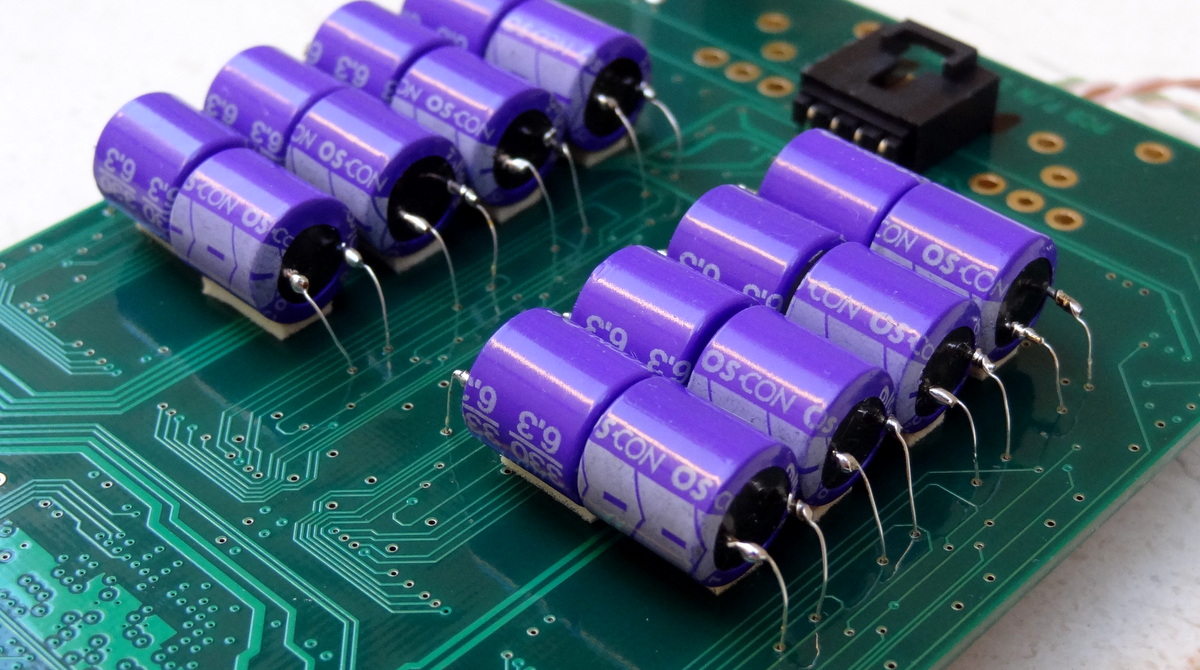
Beautiful!
Note that this is the “best” we can do with a capacitor mod to “clean up” the reference voltage. Whatever we do to ensure a clean reference voltage is limited to what happens inside the shift register. A shift register is designed and specified to switch between two voltages: a high voltage corresponding to “one” and a low voltage corresponding to “zero”. They are also designed to meet a minimum switching speed, but the outputs are not specified to meet a precise voltage, but rather just a minimum voltage for VHigh and a maximum voltage for VLow. It is amazing that this DAC works so well given the fact that it is implemented with shift registers.
The OSCON capacitors I used are old stuff. The company ended manufacturing of those models in 2011. New technology uses solid conductive polymer (rather than Organic Semiconducting Polymer -where the name OSCON comes from).
Newer capacitors have even better performance with respect to low ESR and are very inexpensive. For example the following Nichicon FPCAP R7 Solid Polymer [link] at $0.50 in quantity 10 for a 16V 330 uF, ESR=7 mOhm.
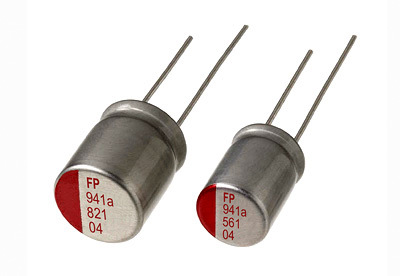
Here is a comparison of FPCAP with conventional electrolytic capacitors

UPDATE: Circuit Simulation
Our friend Filter-Meister Paul has simulated the 16-cap mod (in fact this exact mod) and has shared his results in a 3-part post [parit1] [parit2] [parit3]
The result shows the expected peaking:

Further improvements can be obtained by (comments section of part3):
Stock+1000uF has a fairly big noise gain peak around 3.67KHz. With the load oscillating at that frequency the ripple is 3.595mV. If the load is oscillating at 1KHz ripple is 0.169mV. It will basically follow the same trajectory as the Stock+470uF plot with a lower peak frequency.
Factory Mod +1000uF the sim’d ripple at 1KHz is 1.006mV, while at 3.67KHz it’s 0.510mV. The worst case with the FactMod+1000uF is 1.226mV at 100Hz, which is about 1/3rd the worst case ripple of stock+1000uF.
If you wanted to tweak a bit, try replacing the 0.1R resistor with a 0.01R. There will be a very small amount of peaking above 10KHz but using the 0.01R should cut the ripple quite significantly.
UPDATE: FACTORY FULL MOD
Soren published the official recommendation for modding for Vref [link]:
- The output capacitor of the buffer, can be paralleled (increased) as much as desired, but a single 47uF X5R 0603 capacitor is sufficient and will fit nicely on the board. (Original value is 22 uF)
- The output series resistor needs to be much lower in the order of 0.1 ohm and it is used to eliminate a small peak at the output. This can be done by adding a 0.1 ohm resistor in parallel with the existing 10 ohm resistor. A 0.1 ohm 0603 SMD resistor would fit nicely. (Original value 10 ohm)
- The feedback capacitor is to be removed from the feedback loop by shorting it with a wire or with a 0.1 ohm 0603 SMD resistor [link]. A short can also be used here as indicated by the Soekris: “You can use shorts for the feedback capacitor, but since you already would have to source those 0.1 ohm 0603 resistors it’s easier to use those as shorts…” [link]. (Original value 330 pF)
The result in less than 1 mV p-p ripple independent of frequency; with no peaks or changes in voltage precision. It is also what the next production series will look like.
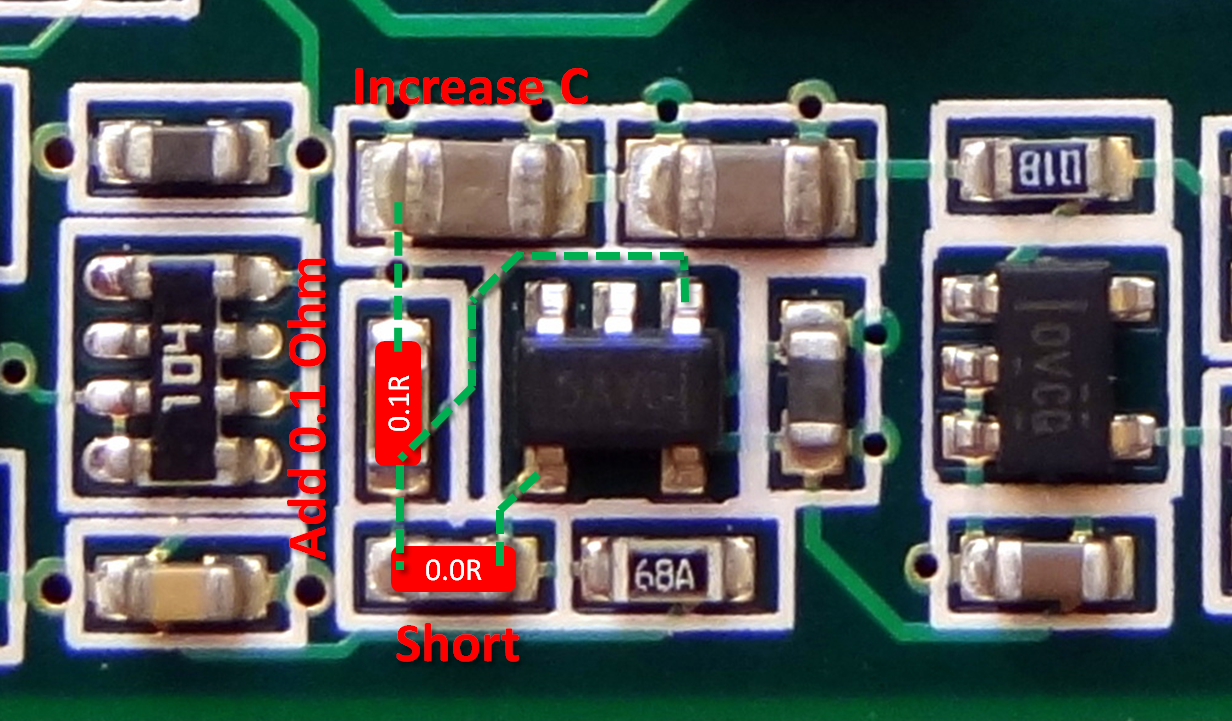
Happy about #1. This is the same as the capacitor mod I have done and good thing that increasing the capacitance as much as desired is OK. I didn’t want to remove some of the capacitors I put in as the mod looks real cool :-).
Recent measurements [link] have shown that the performance (ripple reduction) of this mod can be further improved by adding more capacitance beyond the the recommended 47uF. Glad to know my implementation of the mod is not just for looks :-).
Update [link]: Vref differences between the different versions
- Original rev1: 10R series resistors, 22 uF output capacitor, 330 pF feedback capacitor and 499R feedback resistor
- Factory upgraded rev1 and production rev2: 0.1R series resistor, 47 uF output capacitor, 499R resistors mounted in both capacitor and feedback resistor position (this gives a 998R feedback resistor), creating an effective 0.050R vref buffer output impedance.
- Production rev3: 0.1R series resistor, 47 uF + 3x 100 uF output capacitors, 1K00 resistor mounted in feedback capacitor position (orange), 301R resistor mounted in feedback resistor position (yellow), creating an effective 0.025R vref buffer output impedance.
Colors on attached drawing:
- Red: Output capacitor.
- Blue: Series Resistor.
- Orange: Feedback capacitor (now used for resistors).
- Yellow: Feedback resistor.
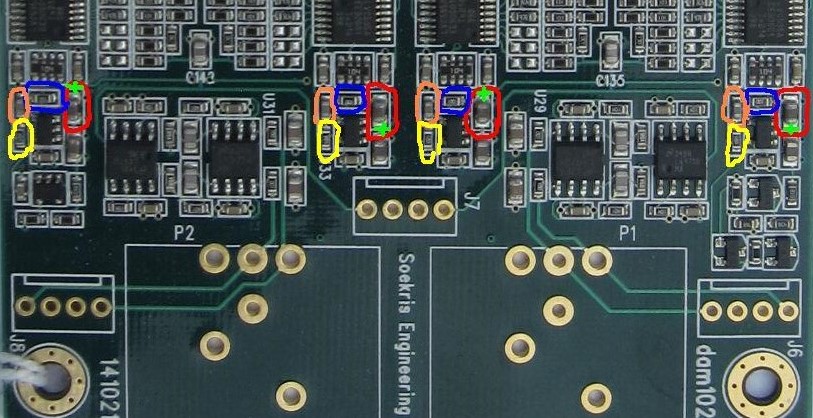
Advantages of this mod
I can think of the following additional advantages of this mod over the recommended factory mod:
- Smaller effective ESR by paralleling several capacitors
- The VCC pin of the shift register is the 0ptimal location for the added capacitor (even though the solid power plane allows installing the capacitor away from the VCC pin)
- For multiple capacitor installation, this is the best “mechanical” approach. It would be hard to mount multiple capacitors at the location of the buffer output capacitor.
For #2, this requires ordering resistors from one of the part shops. Not a common size to find in recycled boards. Got to put a larger order. Not worth paying shipping for a few SMD resistors. Maybe there will be more improvements from the diyaudio community. I’ll wait a little while on this one.
For #3, a wire short will do. This makes a buffer a simple voltage follower. I think this would be easier to do than soldering the 0.1 ohm SMD resistor: bend the wire in U shape, put some solder on the ends and reheat the solder when placed in contact with the ends of the capacitor. This will have to wait for #2
Is #1 alone good enough?
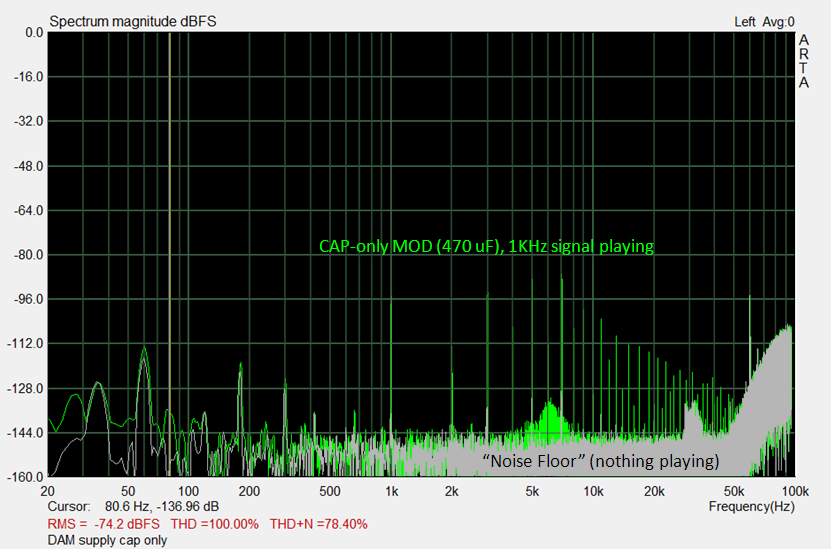
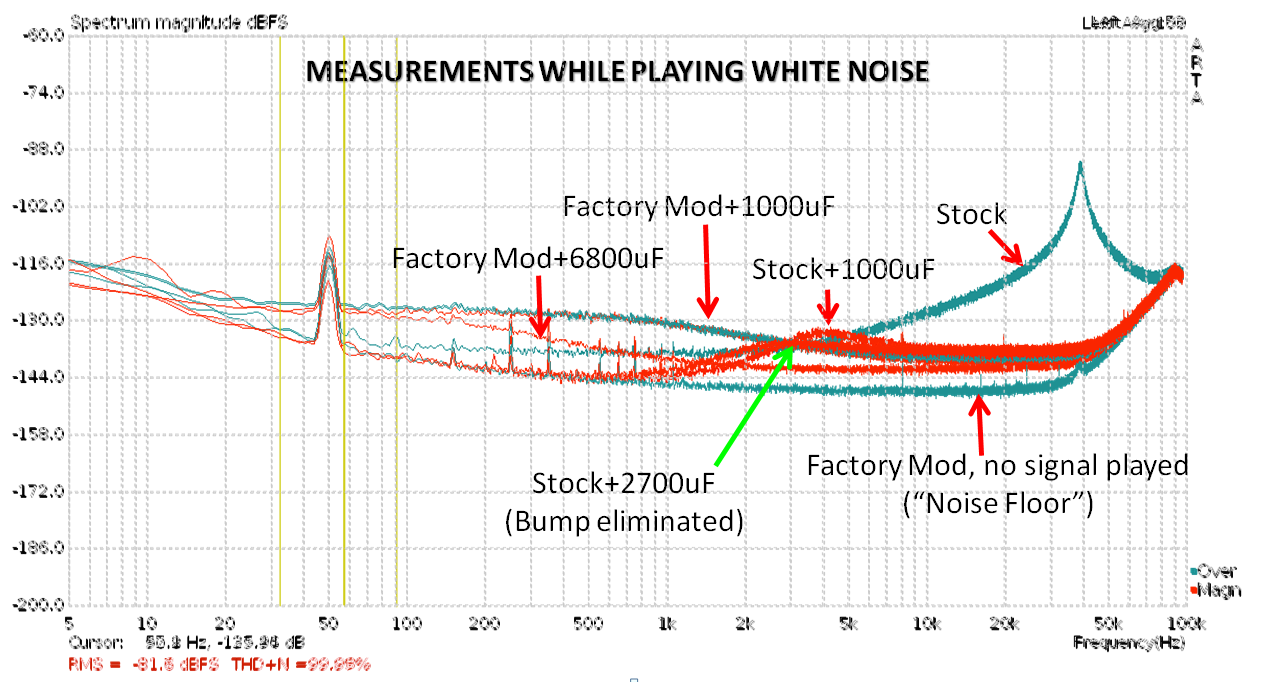
More measurements shared at diyaudio [link] shows the results of different mod iterations. In particular, the stock buffer with 1000 uF of output capacitance compares favorably with the factory mod with 1000 uF. In fact, except for a “bump” at around 4KHz, it has lower noise in frequencies below ~3KHz. Thus the question: is adding 1000 uF to the stock buffer good enough?
I over-imposed several traces to compare the the mods in question:

In this graph, the stock+1000uF is ~20 dB lower noise in the 1 KHz component than the factory mod+1000 uF. Only the components beyond the 3rd harmonic (4KHz and beyond) are slightly higher.

Another set of measurements show a similar result [link]. I believe this mode refers to this cap configuration [link]. The results are pretty similar to the adding of capacitance to the stock buffer’s output capacitor. Notice the “bump”.
Further measurements [link] shows that by increasing the added capacitance from 1000uF to 2700 uF on the stock buffer, the bump is totally eliminated:
Looks like I will leave my mod (which is just adding capacitance to the stock buffer configuration) as-is for the time being. I’ll see what further results can be had from further experimentation.
Update [link]
Soren offers these options for VREF mod:
There are basically two way to good result:
1- The official modification with 0.1 ohms resistors and 47uF capacitors, all smt parts which can be a little tricky to solder…. Afterwards, you can add additional large capacitors, any type. But I admit that soldering 0603 smt parts are not that easy, so:
2- Just add large enough electrolytic capacitors without changing the smt parts, simulations show the best result with 3300 uf low impedance electrolytic on each rail, just your regular good caps, you don’t want their impedance to get too low, 40 mOhm is perfect for the 3300 uF.
There are an additional internal power supply impedance in each LVC595 shift registers, I have measure 0.3 ohm. That mean that there is really no reason to get the vref impedance insanely low….
JUST THE BEGINNING FOR VREF?
I think effectively, this mod brings the reference voltage implementation to the same level as the initial factory recommendation from ESS for the Sabre DAC and implemented in the BI DAC[link]:
The implementation of the critical analog supply, the AVCC, was as recommended in the ESS application note [link] with DVCC is used as a reference to the regulating opamp. This configuration provided a low impedance supply to the analog pins [link]. But he main drawback was the pretty nonexistent PSRR (power supply rejection ratio), so the PSRR of the analog supply was pretty much the PSRR of the DVCC that was used as the reference [link].


So maybe there are more improvements to be made.
However, there are unique challenges in the Soekris DAC to consider: the Vref needs to be of dual polarity and track each other. Another thing to consider is the question of how accurate the reference needs to be when the resistors cannot be more accurate than 0.01%. Further, there are also inaccuracies to the voltage applied to the resistor ladder introduced by the shift registers. So perhaps the current design is optimal at this point in the sense there are no performance bottlenecks nor performance overkill anywhere in the circuit.
FURTHER READING
Check out Filter-Meister Paul’s blog [link]
Another 16-cap implementation [link]

Yet another [link]


One more [link]
R2R DAC Benchmark Filters (for now)
After a 5 month long, 1200-post filter development odyssey [link], our friend Paul have arrived at a set of benchmark filters for the enjoyment of all owners of the Soekris DAC (BIG THANKS!). There is so much material and knowledge in the diyaudio forum thread that it was a challenge to keep up with. Fortunately, Paul will be moving to a blog format to share new filters, but likely after new firmware for the Soekris DAC is released.
I have summarized the latest “benchmark” filters here for convenience.
| Filter File Name |
Type |
Description |
| 1021filtNQ_C960_140 [link] | Nyquist filter “approaching NOS” | Further “tweaking” of the Nyquist filters, less coloured than the C128 series filters. |
| 1021filtNQ_C960_140dp [link] | Nyquist filter “approaching NOS” | Same but quantized in mkrom.exe. (rather than in MATLAB) (sound far more open in the top end and less clouded) |
| 1021filtNQ_C128_100bp [link] | Nyquist filter “approaching NOS” | The “benchmark” filter with correct “quantization”. Use this one instead.The .txt files here [link]Comparison 128 vs 960 here [link], [link]Response comparison with NOS [link] |
| 1021filt_384_C130_MP [link] | Minimum Phase | Further experimentation with minimum phase. This filter is similar in length and roll-off to the stock 44.1 filter, but minimum phase. It is -0.1dB at around 19kHz. Trading “Nyquist” with minimum phase. Notation: 384 = number of taps; C = Chebyshev Window; 130dB = Window side lobe attenuation setting; MP = minimum phase or LP = linear phase.One of the key determining factors is impulse response [link]. Here is the impulse response for the latest favorite filters: [link] |
| 1021filt_SoX_fixup_HiAtt [link], | High Stop Band Attenuation |
|
| 1021filt_1015_Kb16_BW [link] | High Stop Band Attenuation | After a long road, this filter and the previous one are the current “best” filters.
|
| 1021filtNewNOS [link] | NOS | And for convenience sake, the NOS filter remains a favorite.Latest iteration of the NOS filter which includes POS’s improved de-emphasis filter.”The NOS filter does not actually filter at all – all the coefficients are set to 1 so the audio is passed unaltered and is only up-sampled. The side effect is none of the mirror images of the original signal that appear in the up sampled signal are removed…””Listened to NQtb65, NQtb70 (see Nyquist filters below) and NewNOS today. All three are pretty nice. But NewNOS feels distinctively more dynamic, direct and more full-bodied…” |
| 1021filt_EQHQ_V2r1 [link] | “Perfectionist”(Brick Wall) | I call this “Perfectionist” because it is a “best specification” filter: minimum band pass ripple, high stop band attenuation, narrow transition band…- 0.0000003dB pass band ripple constraint – all filters
|
NEW FIRMWARE (JUST SOME DETAILS)
The new firmware will provide the following enhancements for filter development [link]:
2.30 format for FIR filters was chosen to have reserve, thinking there was plenty of bits, especially when compared to other DAC chips, and 1016 taps were also more than any DAC chips. But after following Paul’s fantastic filter work it seems like that improvements are needed to the filter blocks, even as they already are better than any DAC chip.
As the R-2R DAC should be state of the art, I will change format in next firmware rev, probably to 1.34, and instead have the mkrom tool check for overflow, maybe even look into auto scaling…
I’m also looking into double the number of coefficients, that would require to assign double the MAC blocks to the first FIR filter, should be possible as the last MAC block is just doing volume control, that can be done using a multiplier built with a lot of LUT’s instead, not an issue as that don’t need to be fast and there are plenty of LUT’s left in the FPGA, the FPGA was choosen more for number of MAC blocks than number of LUT’s…
This means
- Increase in coefficient precision (4 additional bits)
- Increase in the number of coefficients (up to 2032 coefficients). Basically anything possible with software resamplers (such as SOX) will be possible in the DAC.
UPLOADING FILTERS
Up to now, I have been using the factory filters. It is time to upload and try some of these filters. For convenience, I am repeating here information from other posts.
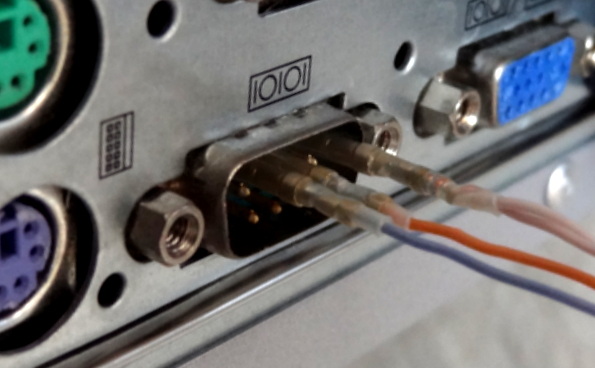
Connect the RS232 Interface to a PC
Connect the RS232 pins to the PC serial port as follows. This is basically a null-modem connection without h/w flow control. You may want to check this informative site on serial communications including RS232 [link]

Launch the Terminal Application (Tera Term) [link]
After launching Tera Term (the application is “ttermpro”), select “Serial” and select the Port you are using to communicate with the DAC.

Configure the serial communication parameters with:
- Baud rate: 115,200 (This is pretty fast. Use a good, short cable)
- Data bits: 8
- Stop bits: 1
- Parity: none
- Flow control: none
Click on the “Setup” pull-down menu and select “Serial port”

Invoking “uManager” for Interactive Mode
Type “+++” and wait for the DAC to respond (~1 sec). You must enter “+++”, otherwise there will be no response. If you enter anything else, there will also be no response. “+++” invokes the “uManager” enabling interactive communication with the DAC through a terminal window. You will see the following prompt:

Uploading the filters
After invoking the uManager, type “download” in the terminal window. The DAC will acknowledge your command and wait for you to start the xmodem transfer

In the “File” pull down menu select “Transfer” -> “Xmodem” -> “Send”. You will see the XMODEM send dialog box (shown below). Select the filter file you wish to upload (in this example “1021filt_1015_Kb16_BW.skr” and click “Open”. Make sure the file is of type .skr.
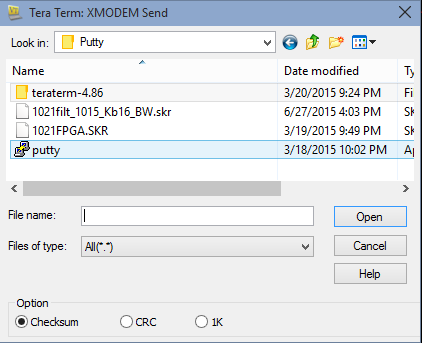
After completion, power-cycle the DAC. Note: changing the input or changing a track with a different sample rate also triggers reloading of the filters
MY OTHER POSTS ON THIS DAC
| TITLE | SUBJECT |
LINK |
DESCRIPTION |
| Soekris dam 1021 R-2R DAC ILLUSTRATED GUIDE | Users Manual | [link] | Users manual for the Soekris DAC. |
| Soekris dam1021 Build | Build Guide | [link] | Details of my initial build of the Soekris DAC. |
| dam1021 R-2R DAC MODs | Mods | [link] | Mods I have performed on the DAC build. |
| dam1021 R2R More Mods | Mods | [link] | Later mods on the DAC build. |
| Digital Filters for Soekris R2R DAC | Digital Filters | [link] | Extensive list of DIY filters from the diyaudio filter brewing forum thread. |
| R2R Benchmark Filters (for now) | Digital Filters | [link] | Latest set of filters developed and shared in the diyaudio filter brewing forum thread. The best filters of the bunch. |
| R-2R DAC For The REST of US | Technical Details | [link] | Introductory post describing the innovations and capabilities implemented in this DAC. |
| The Soekris R-2R DAC: Technical Details | Technical Details | [link] | Additional technical details of the Soekris DAC that were not covered in the post above and collected after I had the DAC on my hands. |
dam 1021 R2R More Mods…
UPGRADING THE POWER SUPPLY
I Have been pretty happy with my current implementation of the Soekris DAC, using a basic “workhorse” 7812/7912 based power supply. These are legendary for their ruggedness and still the most widely used regulator family for most commercial HiFi equipment.
But not having a lot of time and/or patience to try different mods, I mainly rely on good engineering and the collective wisdom of the people at the diyaudio forums. And lately, improvements in sound have been reported using low noise supplies with the Soekris DAC board [link].
In addition, there is always the attraction for “new and improved” and the introduction of low cost, low-noise supplies in recent years makes upgrading an almost a “must do” thing for diy people like us 🙂
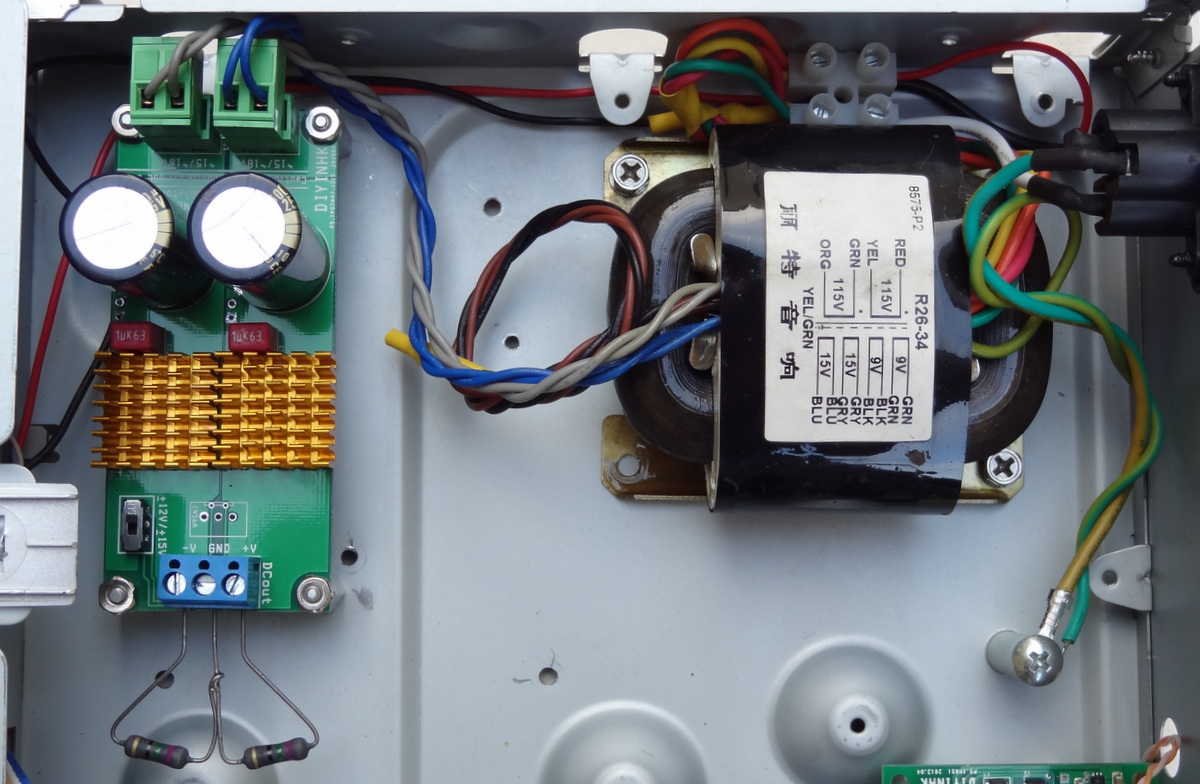
I decided to upgrade the power supply section with a TPS7A47 based power supply kit from diyinhk and an R-core transformer. The TPS regulator has very low noise and a wide operating range. The R-core transformer has multiple (4) secondaries that can feed multiple supplies.
Some users are using shunt regulators for this board. But with the local regulators being of the series type, I don’t think the benefits of a shunt regulator (very low impedance, with “instantaneous” power delivery) can be realized. (Besides I would need to build from bare PCBs and that would take a long time).
Before:

After:

The diyinhk kits are based on the factory recommended PCB layout and as shown in the evaluation boards. As such they should perform as specified in the datasheet.
The kits implement some enhancements over the evaluation board such as built-in AC rectification, large filter capacitors, heatsinks, screw connectors and noise-reducing film capacitor. I am using the +/- 12v-15v bipolar supply kit.
The bipolar supply uses TPS7A47 regulators for both the positive rail and the negative rail. I had inquired diyinhk why not use the TPS7A33 [link] for the negative rail and they replied saying that the chip was very frail and had destroyed a few during prototyping. These kits have been available for a while, implying that they in fact work well.

The transformer has 4 secondaries. I can add two more supplies later… These transformers have the following specs:
- Primary : 0-115vx2,
- Secondaries : 0-9X2(0.7A),0-15X2(0.7A)

What is so good about R-Core transformers?
Here is an excellent resource comparing the different types of transformers [link]. I have summarized here the main advantages of the R-Core:
| Parameter | R-Core |
Toroidal | EI |
| Leakage flux | The Balanced winding cancels the leakage flux. The total amount of leakage flux is extremely small. (1/10th compared to EI) | The winding is not balanced hence there is lot of leakage flux. | There are gaps in the magnetic path and the winding is not balanced resulting in very high leakage flux. Requiring shielding. |
| Efficiency | Very low losses result in better efficiency. Efficiency > 90%. | Efficiency is better than EI transformer but less than R-core transformer. | More losses result in poor efficiency. |
| Exciting Current | Exciting current is minimal as magnetic paths align with the rolling direction of the steel. Also gapless core | Less than that in EI transformer, but higher than that of R-core due to lack of balancing of winding. | Higher exciting current is required due to presence of magnetic gaps, the inability to use the effect of rolling direction of grain oriented steel, etc. |
| Heat generation | Heat generation is minimal due to low Iron loss. The large surface area of the coil allows for better heat dissipation. | The core is not exposed at any point. Thus the heat generated has no area for dissipation. | Due to iron loss the heat generation is more. Large part of the winding is covered inside the core resulting in poor heat dissipation. |
| Size | 40% smaller than EI transformers |
I first tested the supply with two 75 ohm resistors (at 12v this results in 160 mA of current -which is approximately the current consumption of the DAC board). It is always a good idea to test everything while building the circuit. This will prevent frying some component (or even frying yourself). Always exercise caution when dealing with line voltages.
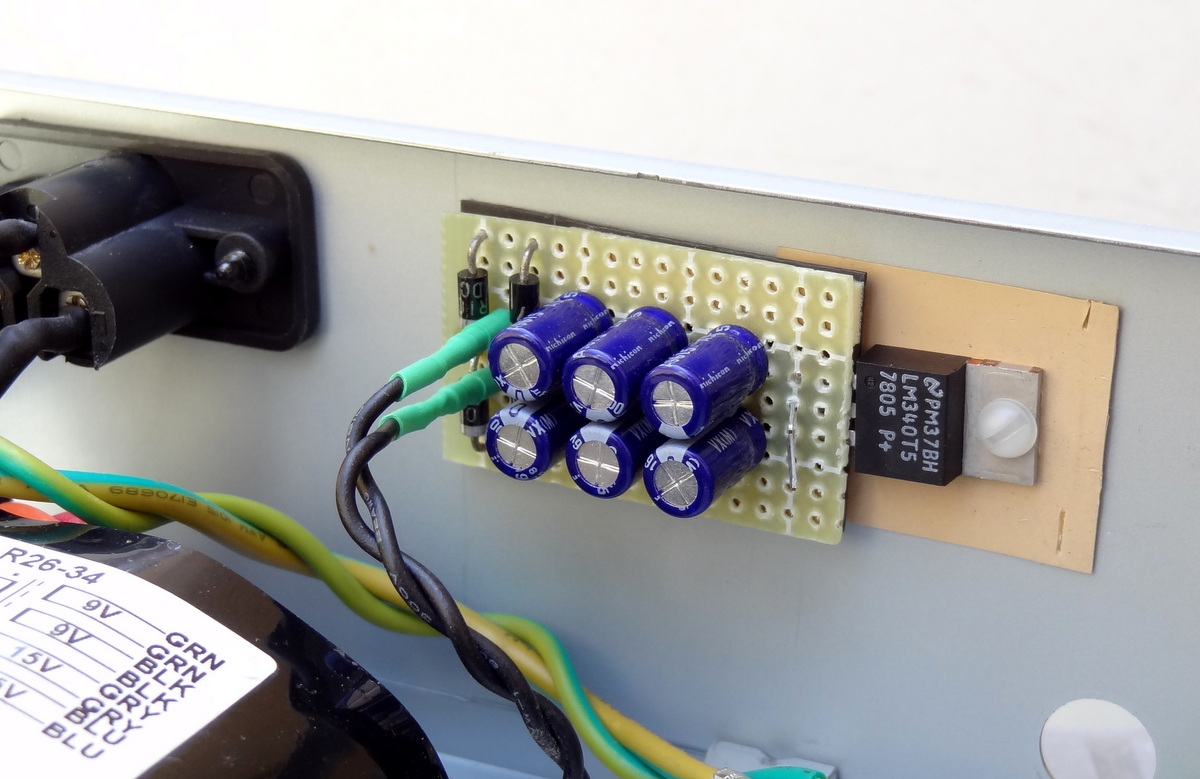
5V Auxiliary supply (for the “dirty” side of the isolators)
HEAD AMP
I have been using the on-board output buffer connected directly to high-impedance headphones (Senn HD-580, rated at 300 ohm). The output buffer, the LME49724 [link] is specified to drive a load as small as 600 ohms while meeting specifications. At 300 ohm, it should be pretty close to spec.

Using the Philips Fidelio X1 (with a measured impedance of 37 ohm [link]), the direct connection seemed less pleasant (than the Senn headphone). Thus the need for a “real” head amp or at least a buffer with sufficient driving capability.
The diyinhk D1X is an inexpensive head amp implemented with a couple of LME49610 high performance audio buffers.


The kit comes with “basic” dual opamps. I had some OPA627s which I obtained when they first appeared in the market, and used those instead.

Due to the size of the dual chip carriers, some of the capacitors had to be installed on the back side.

I mounted it on the back of the case (because there is already a hole for the plug).

Direct connection to the DAC’s raw outputs:
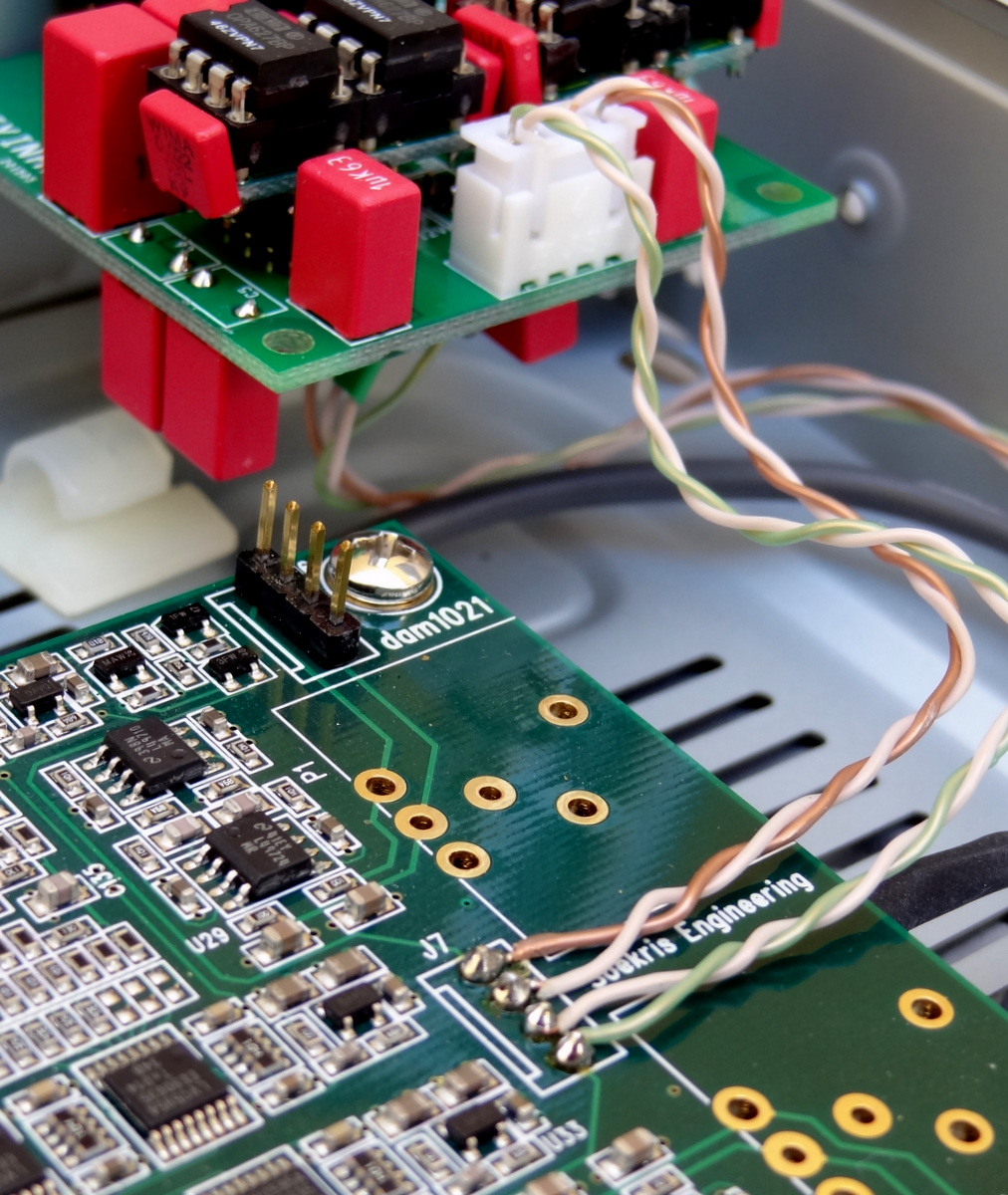
RUNNING TOO HOT…
After hooking up the power supply to the DAC Board and head-amp, the temperature at the heatsink of the power supply was running up to 75C and this is with the case cover off. Although likely a “safe” operating temperature since the specified maximum junction temperature is 125C, this is way too hot for my liking. In addition, with the cover on, it will be heating everything inside the case which will make run even hotter. Regardless of whether it can run at this temperature at extended periods of time, it is just not good practice running your parts are this high temperature.
The 15V outputs of the transformer measured about 18V AC (This results in about 25V DC). This means that with the TPA, being a low drop out regulator, approximately 12V is applied across the regulator itself. With a 12 V output, the amount of power dissipated by the regulator is just as large as the power dissipated by the DAC board – no wonder it gets so hot.
Actually, this would be a very good transformer for a Salas Shunt implementation. From the manual of the Salas, it specifies:
Voltage drop across regulator: Get a transformer that for DC gives you at least 5V extra from your target voltage. 7-10V is better against mains fluctuations, transformer regulation with high current etc.
But the TPA regulators which is a low drop out regulator only requires about .3 V of headroom and 12 V extra is totally unnecessary.

I therefore used a different transformer, this one has 2X 9V AC secondaries and a primary specified to run at 220V. According to the label, each 9V output can supply 0.85A which is plenty for our application (30VA total power).
I rewired it for 120V operation (I don’t remember exactly what I did, but likely I changed the series input connection into parallel connection). The measured output was almost 12V AC loaded. Perfect.

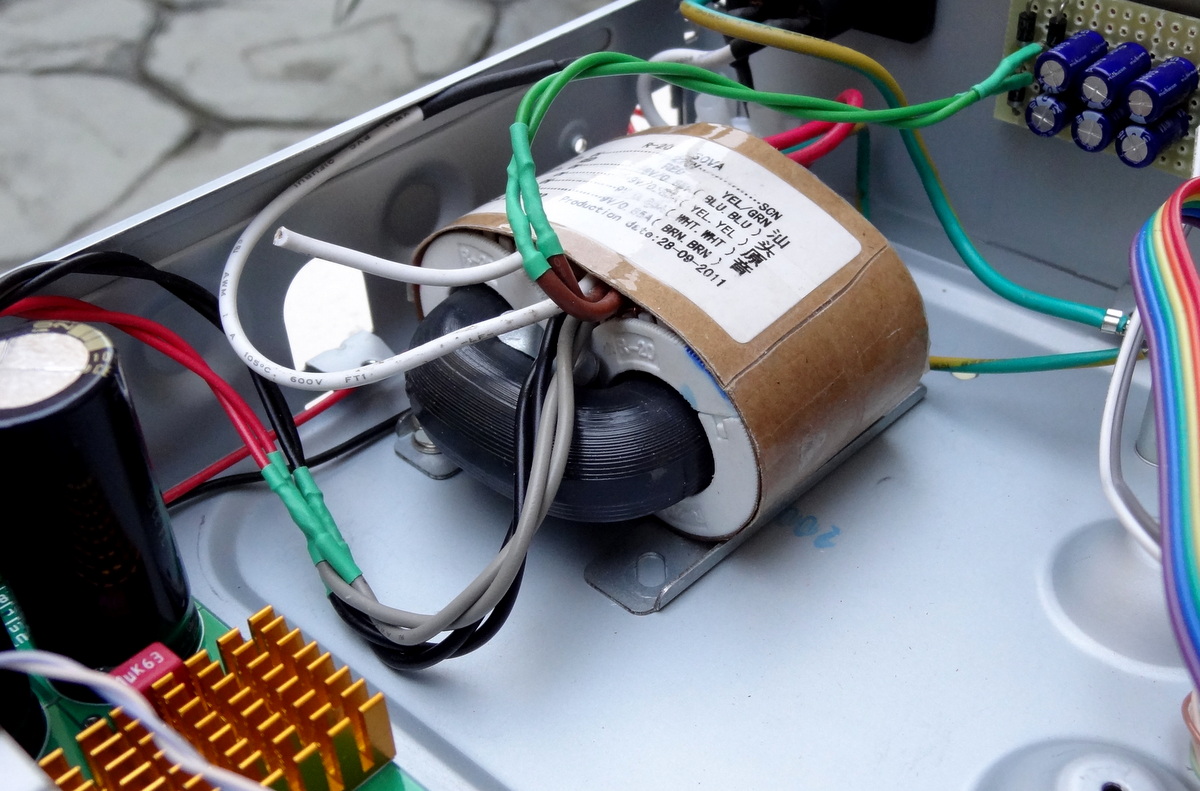

Now running at 35C… Perfect!

ELIMINATING RINGING IN TRANSFORMER SECONDARIES
The correct way is to use a properly designed snubber, but the second best and much easier to do is to use a small value capacitor across the secondary [link]
The ringing is caused by the parasitics of the transformer + rectifier circuit. The parasitic inductance of the transformer windings and routing set up a resonant circuit with the stray capacitance of the circuit. When the current in this resonant circuit is interrupted, as when the diodes turn off, the energy left in the resonant circuit will cause it to ring until the energy has been dissipated in the parasitic resistance of the circuit. The ringing tends to be in the 100s of kHz to low MHz range – so well outside the audio band.
…
There are several ways to address this ringing. One can add a small capacitor (100 nF is usually a good starting point) across each secondary winding. This lowers the frequency of the ringing and effectively suppresses any coupling into the amplifier.
100 nF film caps across the secondaries:

I also added a capacitor across the primary:
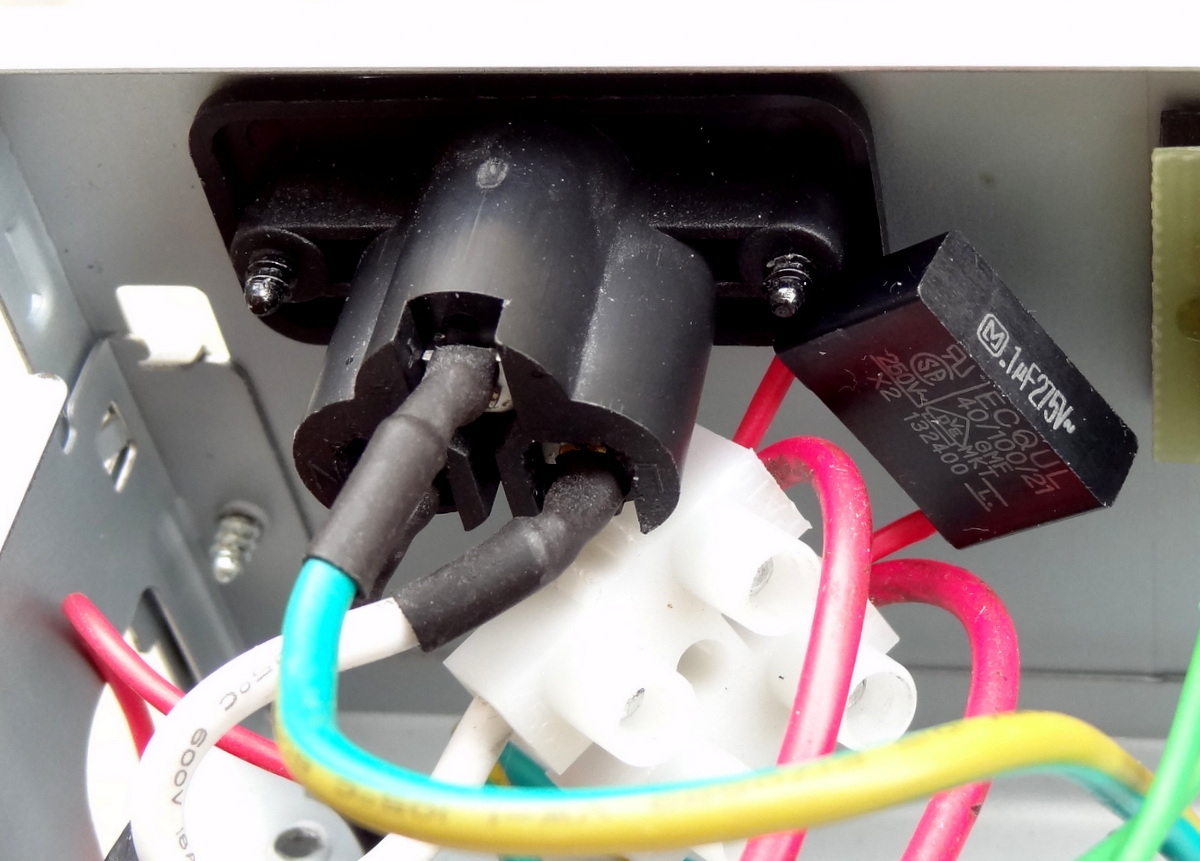
NO MORE POPS
(At least with headphones)
In addition to several enhancements over the original D1 headamp, the D1X implements an output signal relay:
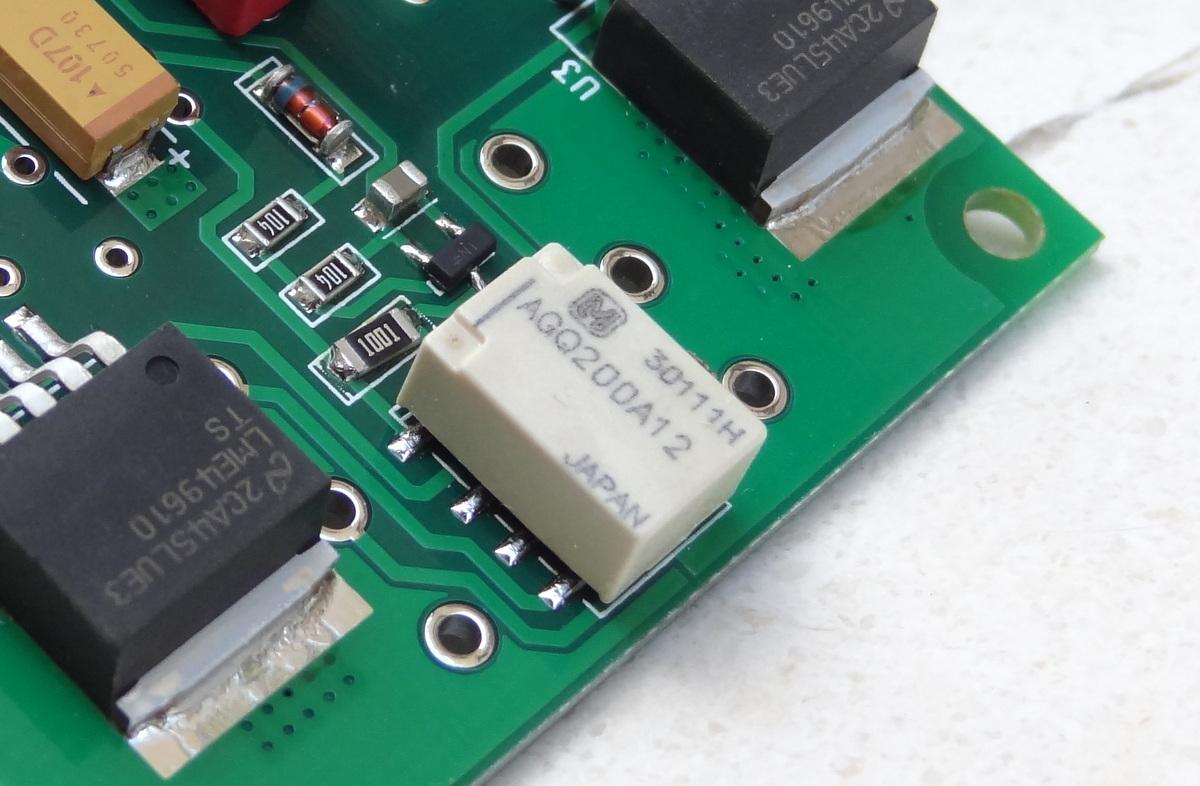
The new distinctive feature is our customized power on delay and instant off output relay circuit. It can prevent the annoying power on/off clicks and pops, and with the DC servo circuit, expensive headphones are further protected from damage.
Especially for this DAC, this feature comes as a real bonus. The incredibly loud POPs during power on/off are totally eliminated.
MY OTHER POSTS ON THIS DAC
| TITLE | SUBJECT |
LINK |
DESCRIPTION |
| Soekris dam 1021 R-2R DAC ILLUSTRATED GUIDE | Users Manual | [link] | Users manual for the Soekris DAC. |
| Soekris dam1021 Build | Build Guide | [link] | Details of my initial build of the Soekris DAC. |
| dam1021 R-2R DAC MODs | Mods | [link] | Mods I have performed on the DAC build. |
| dam1021 R2R More Mods | Mods | [link] | Later mods on the DAC build. |
| Digital Filters for Soekris R2R DAC | Digital Filters | [link] | Extensive list of DIY filters from the diyaudio filter brewing forum thread. |
| R2R Benchmark Filters (for now) | Digital Filters | [link] | Latest set of filters developed and shared in the diyaudio filter brewing forum thread. The best filters of the bunch. |
| R-2R DAC For The REST of US | Technical Details | [link] | Introductory post describing the innovations and capabilities implemented in this DAC. |
| The Soekris R-2R DAC: Technical Details | Technical Details | [link] | Additional technical details of the Soekris DAC that were not covered in the post above and collected after I had the DAC on my hands. |
Digital Filters for Soekris R-2R DAC
(Update 5/9/15)
Great news from Soekris on enhancing the filter capabilities of the DAC [link]:
Original coefficient resolution:
The format used in the FPGA of the dam1021 it’s 2.30 fixed point format for the FIR filters and 3.29 fixed point format for IIR filters. (2 bits for the integer part, 30 bit for the fractional part =32 bits). The mkrom utility (part of the filter tools) reads and process the input .txt parameter files as 64 bit floats, including the multiplier, then convert to the 2.30/3.29 fixed formats in the final step, which are pretty good.
Using full 35bit for coefficient resolution in next version or firmware:
Numeric format will probably change to 1.34, and instead have the mkrom tool check for overflow, maybe even look into auto scaling…
Number of filter taps in next version of firmware: 2032 taps (Original, 1016 taps)
I’m also looking into double the number of coefficients, that would require to assign double the MAC blocks to the first FIR filter, should be possible as the last MAC block is just doing volume control, that can be done using a multiplier built with a lot of LUT’s instead, not an issue as that don’t need to be fast and there are plenty of LUT’s left in the FPGA, the FPGA was choosen more for number of MAC blocks than number of LUT’s…
DIY DIGITAL FILTERS
Upload it yourself
Up to now there has been some attempt in allowing custom digital filters to be uploaded or programmed into a DAC. As an example, the ESS DACs allow the user to program filter coefficients into the internal registers of the DAC through its I2C interface.
I had attempted to do so by carefully following the specification and instructions in the ESS data sheet, but was unable to succeed and after many tries I eventually gave up. Some have claimed success, but no one has shared any information to the audio diy community as to how to make loadable custom filters work. Perhaps there is some information that is not public; perhaps I am not smart enough to do so.
With the Soekris R-2R DAC, custom loadable filters has finally become a practical reality. Practical in the sense that finally “any one” can do this.
Filters that you can distinctly hear
User selectable filters has been available for quite some in DAC boards and CD players. With the Wolfson 8741 a user could choose among five filters, including an “Apodizing” and “Minimum Phase” filters what were all the rage a few years back. The ESS DACs allows the user to select among 3 filters and the better DACs have a collection of filters to select from.
If one peruse the forums for listening experiences involving the Wolfson or ESS DACs, there is not much to say about these filters. At most user reports show very subtle differences between the filters and most of the listening impression reports omit specifying the filter that is being used. When I put together a WM8741 (Twistedpear Audio) a few years back, I spent some time listening to the 5 different filters without detecting much differences.
The listening experiences shared at the diyaudio filter brewing threat shows for the first time (at least to me) clearly discernible digital filters. There could be several explanation for this:
- Manufacturers attempt to maximize measured performance with their filters whereas the Soekris filters are the result of experimentation and evaluation-by-ear. In some cases, the “best sounding -or most likable” filters are NOS or near NOS which measure the worse.
- Manufacturers filters are “short” vs longer filters in the Soekris DAC. This allows more experimentation and fine-tuning. As an example, the Soekris DAC filters can have up 1016 coefficients in FIR1 and up to 120 coefficients in FIR2. In contrast the ESS 9018 DAC allows programming 64 coefficients in FIR1 and 16 coefficients in FIR2.
- There could be some placebo effect too. Now that everyone can manipulate filter coefficients, everyone can hear big differences between the filters
There could be more reasons, but users are having a lot of fun with the diy filters for the Soekris DAC.
[“Disclaimer”: I am still using the factory filters. I am afraid of filter overload and want to wait for the “ultimate” filter :-)]
The filter brewing thread at diyadio [link] is pretty extensive and documents the learning experience of a few individuals. It is a “conversation” among these few individuals and a few brave early experimenters sharing their listening impression.
In an attempt to capture the knowledge from that thread, I have summarized the collection of filters by our friend Paul [link]. A few filters are developed by other users, but the overwhelming majority are from Paul. Instrumental to diy filters is also the free tool “rePhase” [link]. I can’t capture all the knowledge that has been shared (due to my own lack of knowledge) but I think it is a pretty good summary.
Up to today, there seem to have been 3 stages of filter development arriving at a (temporal) benchmark filter.
FIRST STAGE: NOS sounds good…
The first state is mostly imitating the response curves from filters available in commercial DACs. For example the filters from Ayre and the filters from Cambridge DACMagic. This was the stage to get comfortable with the creation tools, the curve plotting tools, the specifications and format of the filters and acquiring general knowledge on digital reconstruction filters. Looking at the different filters created, it seems that the experimentation was kind of random.
Out of this stage, the most notable filter is the NOS filter: 1021filtNewNOS and the filter modeled after the DacMagic: CRaPMagic_LP
| Filter File Name |
Type |
Description |
| 1021filt [link] | Linear Phase, “Standard” Sharp roll-off | This is the original dam1021 factory filter. Actually it is rather “medium sharp”: around -17dB down at 22kHz, and doesn’t fully attenuate until 24kHz [link] |
| 1021filt_FIR2_MP [link] | Same as factory filter above but with different FIR2 | The FIR2 filter has been replaced with minimum phase slow roll-0ff [link] |
| 1021MinPhase-Slowrev1 [link] | Minimum Phase, slow roll-off | Inspired by Ayre’s “Minimum Phase Listen” filter. No pre-ringing, small post-ringing. Ayre’s white paper here [link] |
| 1021LPSRO441 [link] | Linear Phase, slow roll-off | Inspired by Ayre’s “Linear Phase Listen” filter. Minimized pre and post ringing |
| 1021SA1 [link] | Linear Phase Apodizing (slow roll-off starting at 10KHz, -100db at 21KHz) | Inspired by Craven’s Apodizing filter but in linear phase. Minimum pre, post ringing and minimum aliasing, but soft on the top-end because of the much earlier roll-off. Apodizing filters were the rave a few years back |
| 1021SA2F2v1 [link] | Linear Phase Apodizing (slow roll-off starting at ~12KHz, -100db at 22.5KHz) | Same as above but starting roll-off at a higher frequency but still way before 20KHz. Maybe good for old people 🙂 |
| 1021filtPOS [link] | Minimum Phase, sharp roll-off. No pre-ringing, but lots of post-ringing | By POS (creator of rePhase) [link]. “Standard” minimum phase filter. |
| MB2b [link] | Linear Phase, sharp roll-off, using Taylor windowing algorithm, 2x oversampling | MB2b is the same as MB2 [link] but with 2x oversampling [link]. It was used in a shootout with other high-end DACs [link] -very interesting read and well written. dam1021 came out second. |
| DAC 44,1kHz-brickwall [link] | Linear Phase, sharp roll-off. Lots and lots of ringing, pre and post. “Standard” filter. | By POS. Possibly equal to the original filters. But this is in rePhase format. Use this as a learning tool to create the filter coefficients and then use Soren’s tool to convert to binary formal for uploading to DAC. |
| 1021filtNewNOS [link] | NOS (Since there can only be one NOS filter, this is the only one to use) | Latest iteration of the NOS filter which includes POS’s improved de-emphasis filter.”The NOS filter does not actually filter at all – all the coefficients are set to 1 so the audio is passed unaltered and is only up-sampled. The side effect is none of the mirror images of the original signal that appear in the up sampled signal are removed…””Listened to NQtb65, NQtb70 (see Nyquist filters below) and NewNOS today. All three are pretty nice. But NewNOS feels distinctively more dynamic, direct and more full-bodied…” |
| 1021filt_35HR_LP [link] | Linear Phase, sharp roll-off, FIR2 has 3.8 dB attenuation (this is totalcrap v1) | Another brick-wall filter with lots of pre and post ringing, with a 3.8 dB attenuation in FIR2 to prevent clipping and benefit those not using digital volume control |
| totalCRaP_rev2 [link] | Same as V1 above, but FIR2 is (linear?) slow roll-off | Experimenting with changing FIR2 filters. The TC filters are actually sharper than the original factory filters. More ringing than factory. [link] |
| CRaPMagic_LP [link] | Linear Phase, Slow roll-off (-8dB at 22KHz) | Modeled after DacMagic Linear setting. Check user manual for filter behavior: [link]. I think this has similar behavior as Ayre’s Linear Phase “listen” filter. This filter also has a MP slow roll-off FIR2 [link] |
| 1021filt_Mix-Phase1 [link] | Mixed phase. Near minimum phase, slow roll-off, minimum ringing | Inspired by Ayre’s MP filter |
| A_CRaP_take on_BH [link] | Intermediate Phase, 80 dB Stop Band Attenuation (tradeoff between ringing and aliasing) | Inspired by John Swenson/Bottlehead:“The intermediate phase splits the difference and has a small amount of pre ringing and post ringing that is a little bit longer than linear phase but much less than minimum phase. This is also deliberately a short filter”.[link] |
SECOND STAGE: Intermediate Phase is good too…
During the second stage of filter brewing, our friend Paul focused (I think) in reducing ringing and in particular pre-ringing by using slow roll-off response and intermediate phase (a combination of liner and minimum phase). The realization at the end of the experiments is that the length of the transition band (the rolling off part) and the amount of phase mixing has a lot to do with how we perceive sound. Small changes in the size of the transition band and small changes in the amount of phase mixing can result in substantial improvements.
Based on the results, there seem to be a lot of experimenting left since there are 3 variables that can be changed: start of roll-off, size of transition band, and amount of phase mixing.
Out of this stage, the most notable filters are the 1021filtIPv4_p30 and 1021filtIPv4_p35 filters.
| Filter File Name |
Type |
Description |
| 1021filt_DTYWS [link] | Linear, “medium sharp” roll-off. (For old people) | DTYWS (“Damn Those Young WhipperSnappers”). Is a filter that has been customized to “old people” that can’t hear past 16KHz. It starts to roll-off at just under 16kHz, is down a comparatively restrained 22dB at 20kHz, is -130dB at 22kHz and bottoms out at -180dB at 22.4kHz. It’s only -0.02dB at 17kHz, then -0.8dB at 18kHz, -6dB at 19kHz, and -21.5dB at 20kHz. Measurements here [link] |
| 1021filtIPv1 1021filtIPv2 1021filtIPv3 [link] | 3 Intermediate Phase filters slow roll off, with different size transition bands and -6dB point. Stop band starts around 25-26kHz so there will be some imaging. (Also for old people) | V1: roll-off starts at 16KHz and has a transition band of 10,000 Hz. -6dB is at 20.0KHz. “Sounds a little bit too soft in the top end. Cotton wool wrapped, and lacking in detail”. V2: roll-off starts at 17KHz, transition band is 9,500 Hz. -6dB is at 20.5KHz. “Increasing the -6dB point by 500hz, and narrowing the transition band by 500hz removes most of the cotton wool effect”.V3: roll-off starts at 17KHz, transition band is 9,000 Hz, -6dB is at 20.75KHz. |
| 1021filtIPv4_p25 [link] 1021filtIPv4_p30 and 1021filtIPv4_p35 [link] | Intermediate Phase with p=25 (p=0 is minimum phase, p=100 is linear phase). Starts rolling off much later than above filters | V4: -0.1dB at 19kHz, -10dB at 22050hz. fully attenuated at just over 26kHz. Has new linear FIR2 which is now flat out past 40kHz and attenuates below 300kHz.. .txt files here: [link](These filters are a favorite among users) |
THIRD STAGE: “Near NOS”…
During the third stage of filter brewing, there seem to be a drastic turn to what is called “Nyquist Filters”. Nyquist filters “keeps all the original samples”. Meaning it starts attenuating “late”. The Nyquist filters have the -6dB point fixed at 22050Hz. What can be experimented with is the size of the transition band and the type of windowing used.
Our friend Paul is gaining knowledge and realizes:
What I’m finding with the latest filters is that the transition band width is a critical parameter for determining the tonal balance of a filter (changes of 250hz and that makes audible differences). Until I learn more about what works and what doesn’t I’m not especially concerned about filter length or the amount of ringing. I firmly believe we have been barking up the wrong tree by focusing on cutoff frequency and pre-post ringing.
With the knowledge gained from the experimentation to this point, a benchmark filter has arisen: the 1021filtNQ_C128x110 filter
| Filter File Name |
Type |
Description |
| 1021filtN3_corr [link] | Linear phase Nyquist filter | The Nyquist filter is one that “keeps all the original samples”. With the -6dB point fixed at 22050Hz. “Using a kaiser window the filter is -0.035dB @ 19kHz, -76dB @ 26kHz, and -162 at 27.05kHz. Not exactly what you’d call rolled off in the audio band.” |
| 1021filtNqF2 [link] | Same as Nyquist filter above but with Nyquist FIR2 | The gain on the FIR2 filters has been returned to x8 so that the peak coefficient is scaled to 1.000 (0.125 * 8) to preserve the original samples. |
| 1021filtNQv3UG_qnt [link]1021filtNQv4RG_qnt [link] (reduced gain) | Unity gain version with FIR1 and FIR2 set to x8 and a version with reduced gain to match the IPV filters | This version further noise “optimized” with MATLAB (the original in post 631). “Compared with IPv4_p30 there is a very distinct loss of high end detail with the Nyquist filters.””v4RG considered to be rolled off in the high end and female vocals behind a “curtain”.” |
| 1021filtNQtb65 [link] | Tuned version based on the Pflaumer patent | Has a bit more HF emphasis than the CRaPMagic filter.”Vastly improved high-end response and no obvious curtain effect on female vocals. The main change to the filter is that the width of the transition band was decreased to 6.5kHz making the filter slightly steeper.” |
| 1021filtNQtb75 [link] | Same as above with transition band increased 1KHz | “NQtb75 is a little too polite”. (“soft”); the “70” filter can be found here [link]“I feel that the NQtb65 is an improvement over theIPv4_pxx.skr, “less curtain” and noticeable better spatial resolution. The NQtb75 also has perhaps some “less curtain” effect, but not that spatial resolution. |
| 1021filtNQ_C128x110 [link] and with a minor adjustment c128_100 [link]
Same but with FIR2 at 8x: 1021filtNQ_C128_100v8 [link] and 1021filtNQ_C128x110v8 [link] |
Nyquist filter “approaching NOS” | Short filter – only 128 coefficients long and has very little ringing. Very slow roll-off having -2dB at 19kHz and only fully attenuates at 33.5kHz. Main change is the use of Chebyshev window to control the level of side lobe attenuation, instead of sticking with Kaiser windowing.”A big step forward in SQ over the other Nyquist filters”. Comparison of this filter with NOS: [link] “For the time being I think this is probably a benchmark filter” |
MY OTHER POSTS ON THIS DAC
| TITLE | SUBJECT |
LINK |
DESCRIPTION |
| Soekris dam 1021 R-2R DAC ILLUSTRATED GUIDE | Users Manual | [link] | Users manual for the Soekris DAC. |
| Soekris dam1021 Build | Build Guide | [link] | Details of my initial build of the Soekris DAC. |
| dam1021 R-2R DAC MODs | Mods | [link] | Mods I have performed on the DAC build. |
| dam1021 R2R More Mods | Mods | [link] | Later mods on the DAC build. |
| Digital Filters for Soekris R2R DAC | Digital Filters | [link] | Extensive list of DIY filters from the diyaudio filter brewing forum thread. |
| R2R Benchmark Filters (for now) | Digital Filters | [link] | Latest set of filters developed and shared in the diyaudio filter brewing forum thread. The best filters of the bunch. |
| R-2R DAC For The REST of US | Technical Details | [link] | Introductory post describing the innovations and capabilities implemented in this DAC. |
| The Soekris R-2R DAC: Technical Details | Technical Details | [link] | Additional technical details of the Soekris DAC that were not covered in the post above and collected after I had the DAC on my hands. |
Soekris dam 1021 R-2R DAC ILLUSTRATED GUIDE
(03/24/15) Updated the filter table.
I am consolidating all the user-level information in this post that is spread through several other posts. Where needed, I will clarify and include the latest available information.
GENERAL LAYOUT
Ref: [1527]
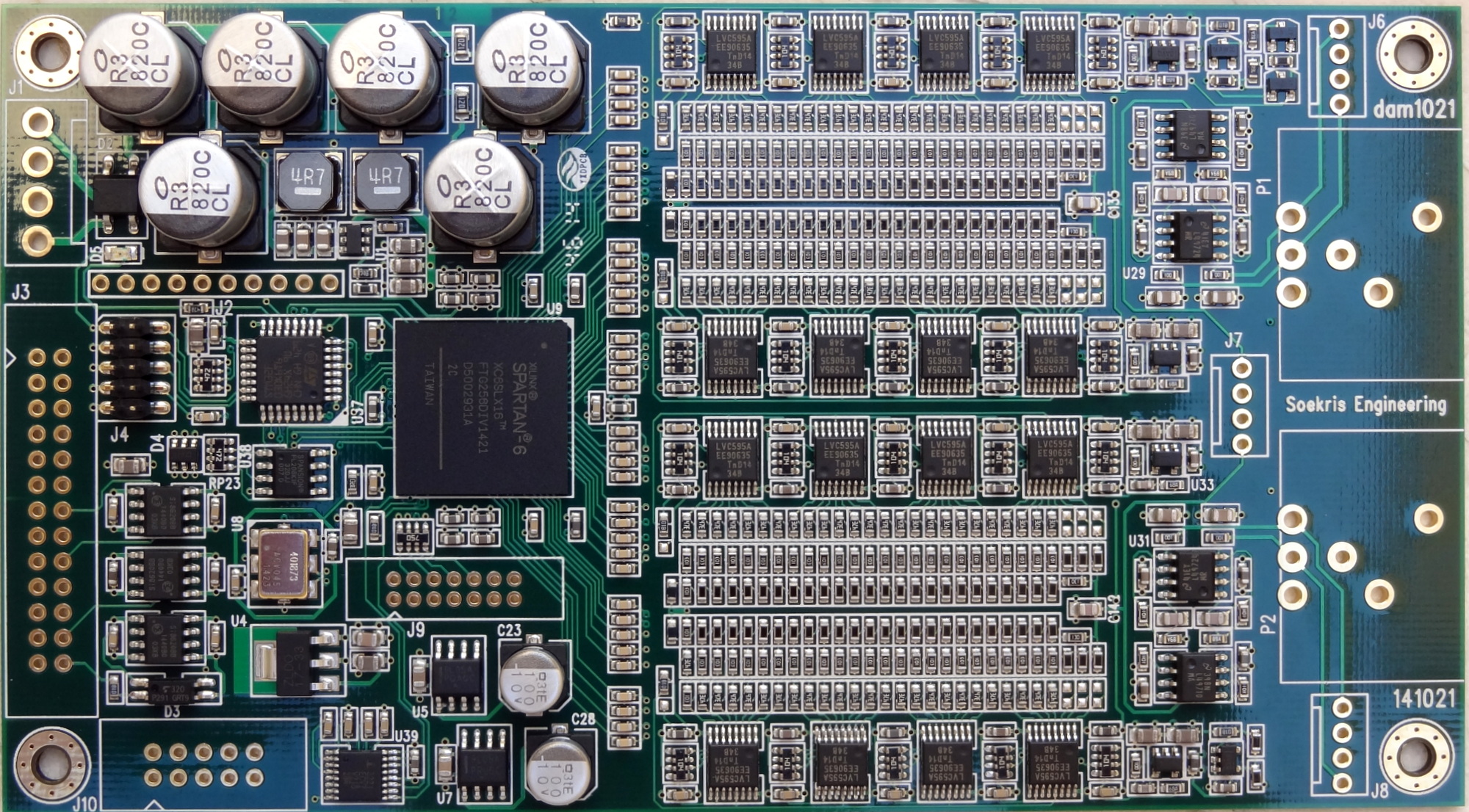
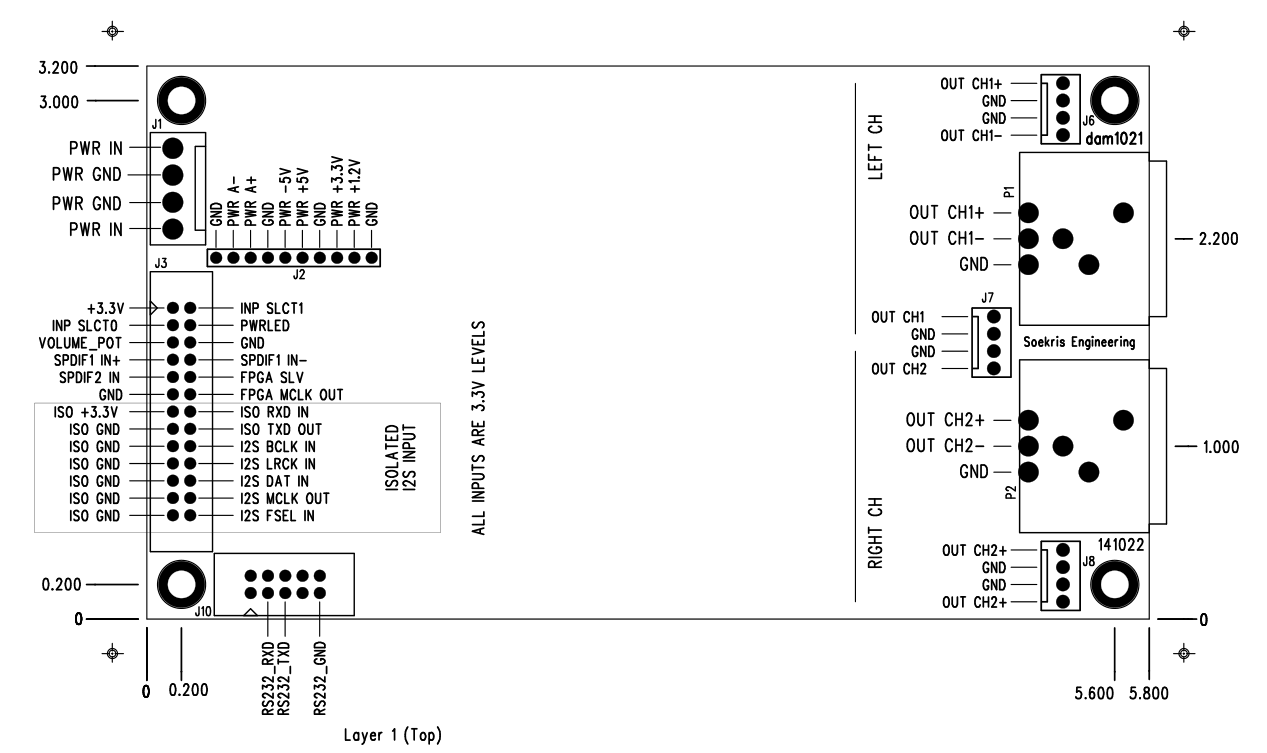
Note: in the diagram above the labels for “RIGHT CH” and “LEFT CH” are swapped. This was noted in the forums [1147] and I also checked it with a R/L test track.
The correct channel assignment (when viewed from the output side) is:
- Right Channel is on the right hand side
- Left Channel on the left hand side

NOTE: it could be possible to swap channels in software, but not possible with the current version of the firmware. Channel assignment is required for mono operation.
Update: firmware 0.99 [link] allows you to configure the DAC as MONO Left or MONO Right, but you still cannot swap the channels.
AUDIO INPUT CONNECTIONS
The dam 1021 supports the following input connections:
- Two SPDIF inputs.
- One Isolated I2S
SPDIF Inputs
You may use one for Toslink and one for transformer isolated Coax as follows [1108]
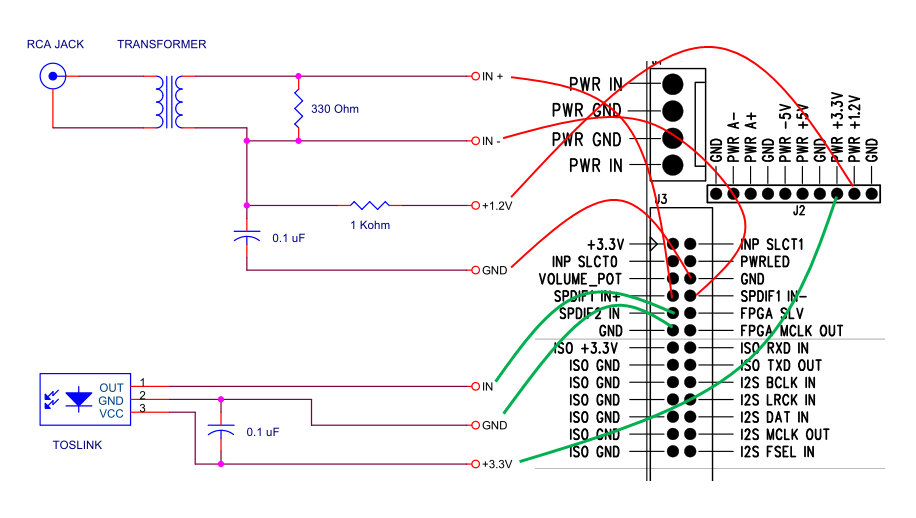
Notes:
1.2v and 3.3v power can be taken off the DAC board as indicated in the diagram.
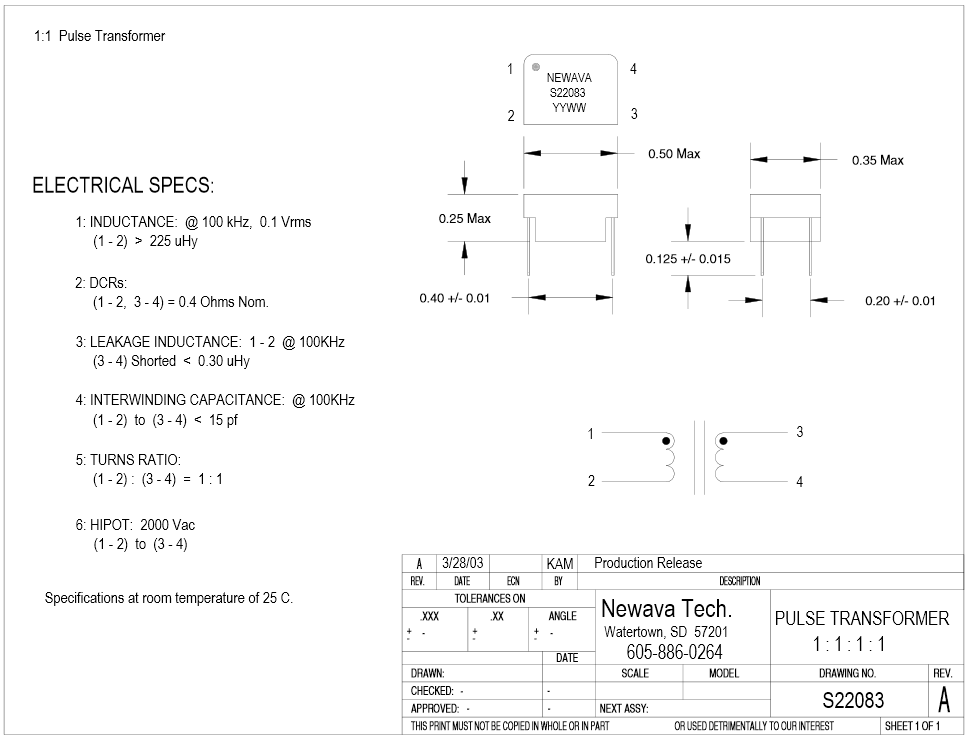
The isolation pulse transformer for the COAX input is a 1:1 type. The Newava Technology Inc S22083 is a favorite [link]. You may find more recommendations in the diyaudio implementation thread [link]
A toslink receiver can be wired as shown in the diagram. The Toshiba TORX147 [link] is a favorite. Seems Toslink receivers are hard to find in the component stores. eBay seems a good source [link]
A nice Toslink module is the one from Twisted Pear Audio [link]. (It is the one I own). This one has an on-board 3.3V regulator (IC1 in the diagram below) and is to be powered by 5-12V DC. This one has the Toshiba TORX142 module (25Mb) with supports up 192KHz sample rate (data sheet: torx142l), but Toshiba stopped making them. The current one that is on sale at the TwistedPear Audio store is specified to support up to 96KHz and uses the popular and current Toshiba TORX147.
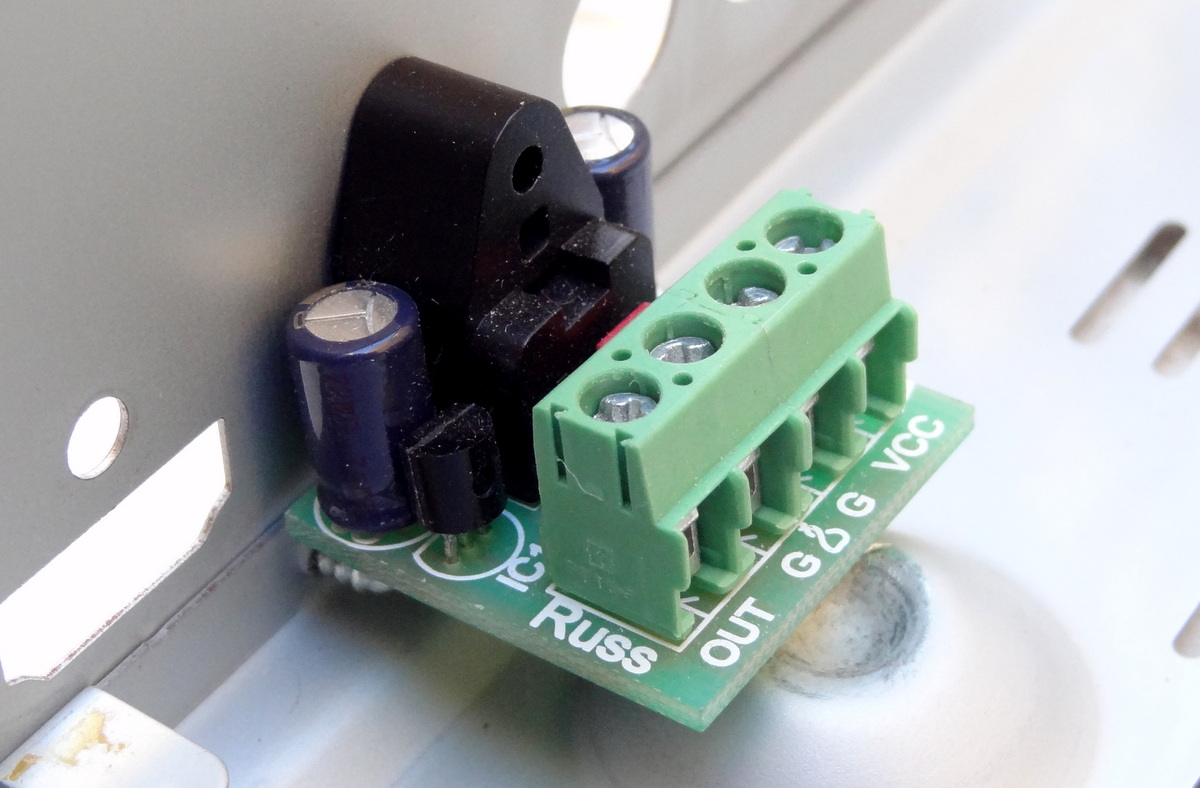
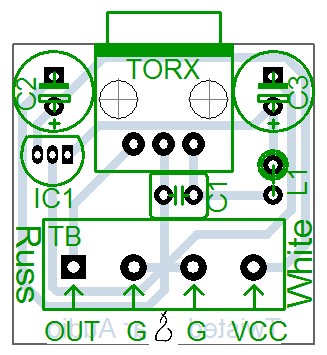
DIYINHK Also has a very inexpensive ($4.00) Toslink receiver: [link]

The difference with the one from TPA is the lack of a local voltage regulator, so you need to provide 3.3V power (which is readily available from the DAC board)
I2S Input (Isolated)
The dam 1021 DAC implements a FIFO reclocker and therefore it does not need master clock input. It works similarly to many modern DACs where an internal PLL or equivalent circuitry locks to the bitclock and generates its own master clock.
The I2S input lines are also noise-isolated with Silicon Labs digital isolators [link]. This means that power needs to be provided to the isolator chips.
Thus the following connections are needed
- Connect I2S source BCLK to DAC I2S BCLK IN Pin
- Connect I2S source LRCK to DAC I2S LRCK IN Pin
- Connect I2S Data to DAC I2S DAT IN Pin
- Provide source 3.3V to ISO +3.3V Pin
- AND connect I2S GND to ISO GND
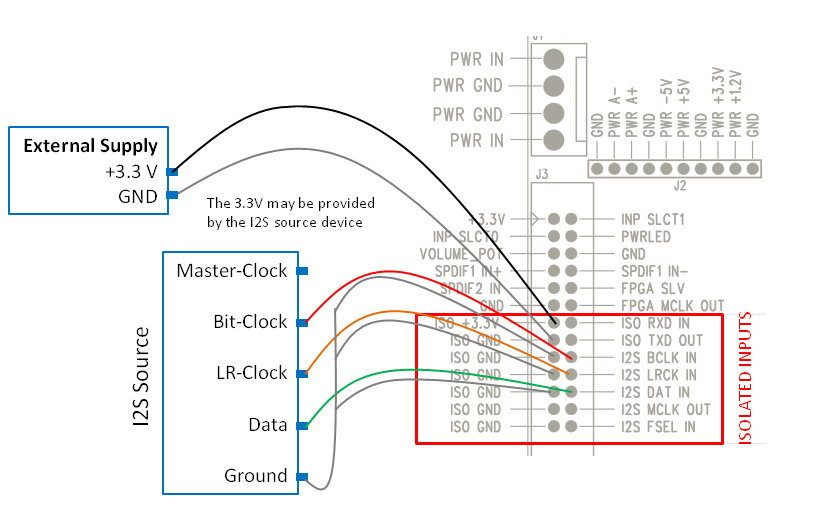
You may also also tap into a 3.3v line in the I2S source if an external supply is not available.
Here is an example using diyinhk USB to I2S adaptor:
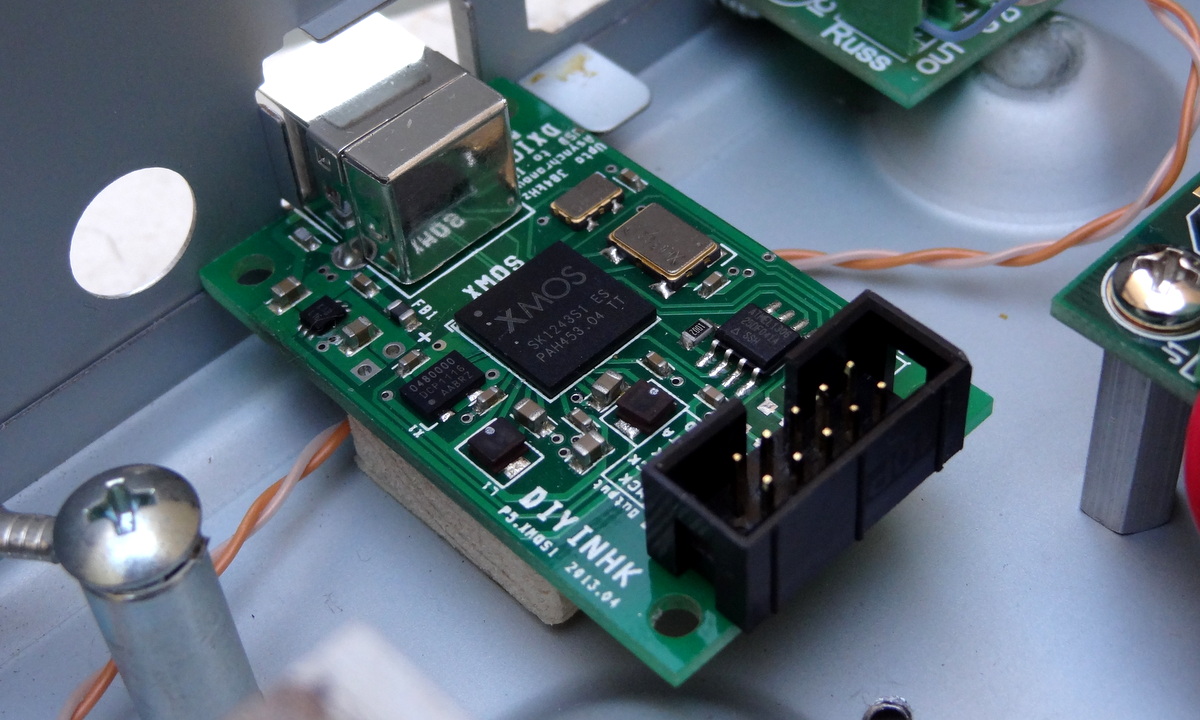

The I2S wires (the multicolored ones)

5V for the ISOLATED INPUTS
According to the data sheet of the the Silicon Labs digital isolators on the board [link], the supply voltage can be 3.3V or 5V. With 5V you can use I2S inputs that are 5V. I have been using 5V supply and works well with 3.3V input signals.
Note that the isolator works by having separate power supplies on each side: the clean side (which is the DAC) and the “dirty” side (which is the I2S source). In order to provide complete digital isolation – meaning “isolated power and ground”, the two supplies must be completely separate. More here [link].
The power supply of the clean side is provided by the DAC board and cannot be externally accessed. The power supply for the “dirty” side is (and must be) provided externally.

Input Selection
The DAC supports automatic or manual input selection as follows:
| Input | INPSLCT0 Pin (J3) |
INPSLCT1 Pin (J3) |
Description |
| Auto Selection | Open | Open | DAC will search the 3 inputs for a valid signal and lock when a valid signal is found |
| I2S | GND | GND | Note that even when not used the USB-I2S interface might output a clock that the dam1021 lock on to…. |
| SPDIF 1 | Open | GND | This input is a sensitive LVDS Receiver -used for Coax [1076] |
| SPDIF 2 | GND | Open | This input is a standard 3.3V digital level -used for Toslink |
I recommend you try Auto Selection first (there is nothing to do). It works very well. Then if you have several sources and more than one active at any time, then implement some circuit (or use an Arduino) to select the desired input.
Signal LOCK indicator
- Steady on: signal lock
- Blinking: no signal or no lock

AUDIO OUTPUT CONNECTIONS
The dam1021 DAC provides the following outputs
- Stereo single-ended RAW outputs
- Stereo balanced buffered outputs which can also be used single-ended
- Both outputs are active and can be used concurrently
RAW outputs
The raw outputs come straight from the resistor ladder passing just through a low pass RC circuit. Raw outputs provide the cleanest, unprocessed output possible most desired by audio purists. It can be connected directly to an amplifier which typically have high input impedance (>10K ohm).
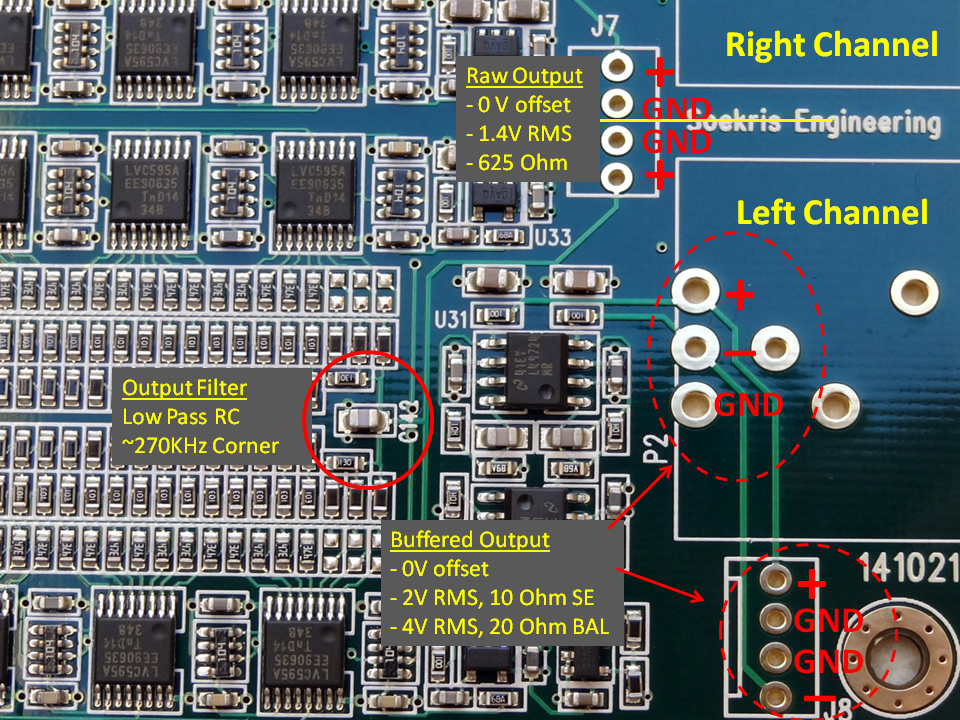
Note: Balanced offset has been measured to be 2V [link] -need to confirm…
Buffered Outputs
The raw output signal is also routed to a buffered single-ended to balanced signal converter as shown in the following diagram:

Buffered Outputs Balanced Connection

Buffered (and RAW) Outputs Single-ended Connection

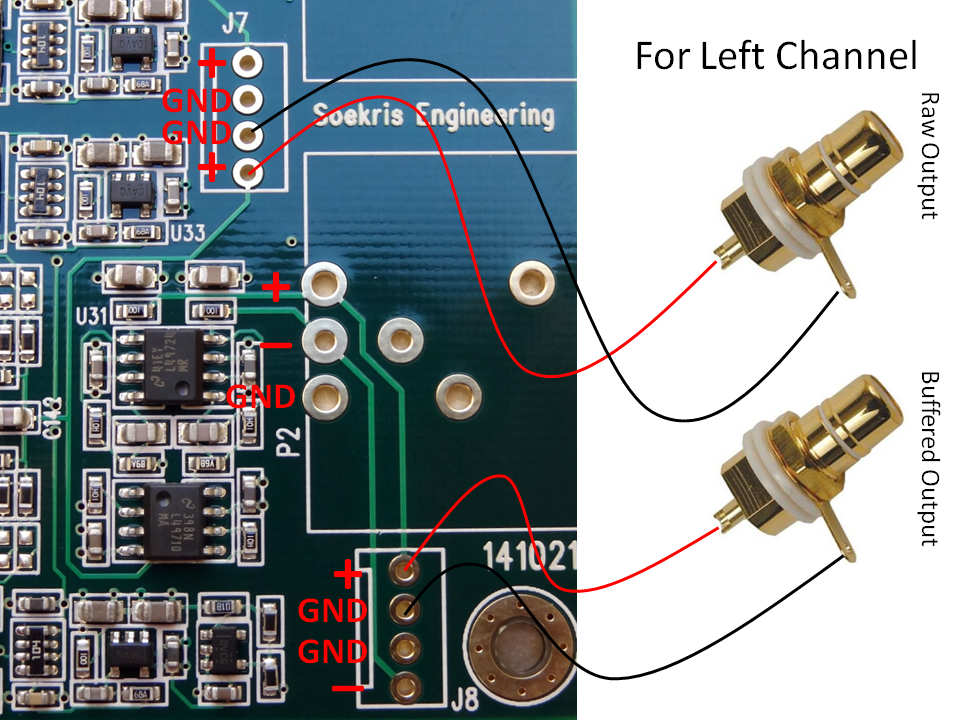
The buffered outputs are designed to drive high impedance headphones directly. Here is an example connection to headphone outputs:


I am using a Sennheiser HD-580, with a 300 ohm nominal impedance [link]. Sounds fantastic.
CAUTION: direct connection to an amplifier can result in passing the power on/off pops of the DAC potentially causing damage to the speakers. Follow proper power on/off management: turn the DAC on before turning on the amps and turn the DAC off first before turning off the the amps turn the amps off before turning the DAC off. This power sequence will ensure that the pops will not go through the amplifier circuit to the speakers.
If you are using direct connection (of the buffered output) to a headphone, the pops would be annoying but, at least in my case, they would not damage your headphones.
DIGITAL VOLUME CONTROL
Reference: [link]

The built-in digital volume is enabled with a potentiometer connected as such:
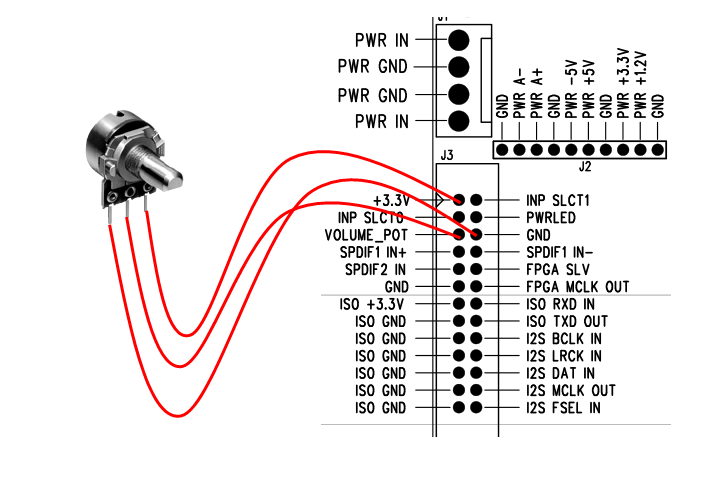
The nominal value for the pot is 10K ohm but any pot would probably work because it is used to set a voltage between 0 V and 3.3V to pin “VOLUME_POT”.
The typical configuration of a potentiometer is the one shown above where the middle pin is the wiper and the end pins are the end connections to the resistance. If you find that your potentiometer does not work as intended you can follow this simple method:
- Find the two “end” pins by measuring the resistance as you move the knob. When then resistance does not change when turning the knob, those are the “end” pins that connect to 3.3V and 0V. The third pin goes to the VOLUME_POT pin
- If you experience that volume decreases when turning the knob clockwise, reverse the connections
If nothing is connected, the volume level defaults to 0 db.
The advantage of using a potentiometer, as compared to using a rotary encoder (which at the moment is not supported anyway), the DAC always starts with the last volume setting.
POWER CONNECTION
The DAC implements several local regulators and therefore it is designed to operate out of a single center-tapped transformer. It can also work with DC input.
The requirements and specifications for the power supply or transformer are as follows [901], [848], [1130]
- DC: +/- 7.5V DC to +/-15V DC; preferable 9-12V DC
- AC: dual secondaries 2x 7-8V AC or center-tapped 0-16V AC
- Power consumption: 2.4V. Thus a 5W transformer is preferred
Transformer Hookup
A favorite transformer is the Hammond 229 series [link] it is a “dual-split bobbin” design with low EMF radiation. It is a step up from the standard low cost transformers.

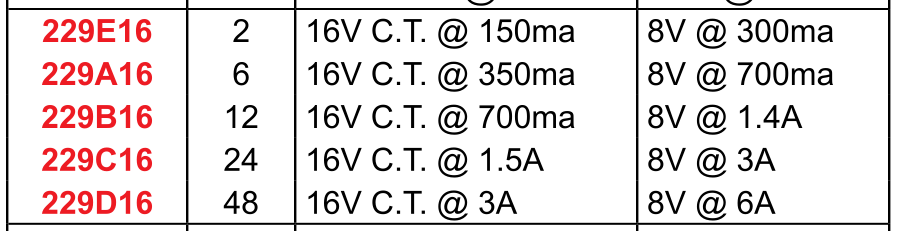
A 229B16 (rated at 12VA)would be an excellent fit with ample power for DAC. It is available at Digikey for about $16 [link]
Another option is a low voltage toroidal transformer. A good example is the Amveco 70050 rated at 10VA [link]
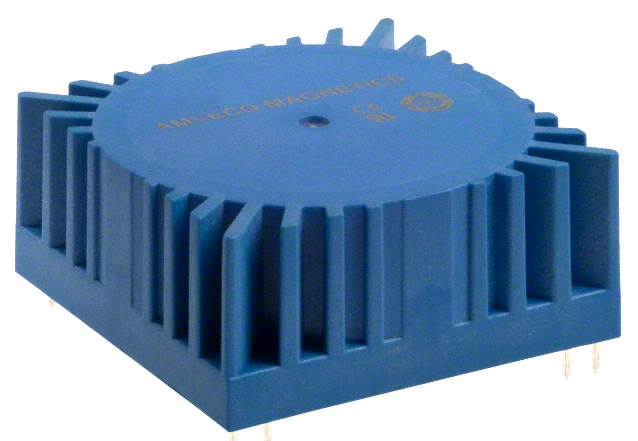

The basic hookup of a transformer to the DAC is as follows:

WARNING: AC MAINS voltage can cause death. If you don’t know what you are doing, don’t handle mains voltage.
DC Supply Hookup
The basic supply would be a bipolar +/- 12V supply. A low cost 78xx/79xx-based regulators would be good step up from a transformer-only supply
Note: the on-board bridge rectifier is a fast/soft switching bridge and a low cost DC supply comes with standard diodes/bridge – you may be trading off regulation with increased high frequency noise.
You can find plenty of adjustable supplies on eBay for very little money:
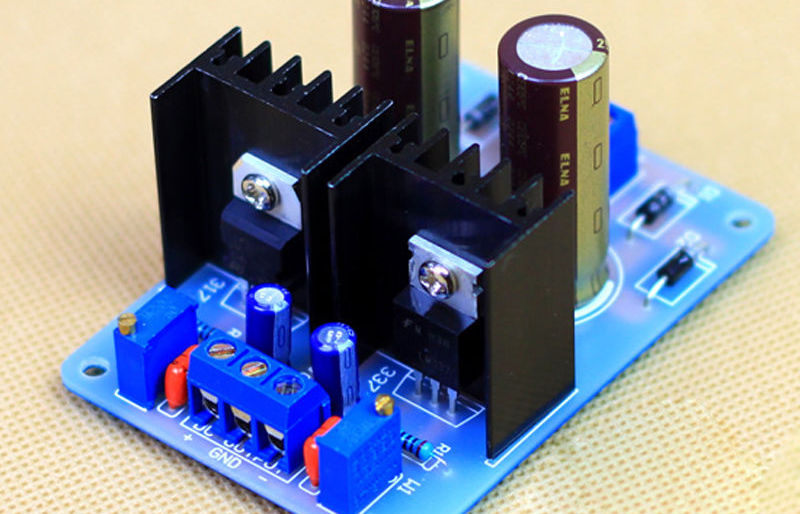
Or better yet, get a higher quality one from diyinhk which includes name-brand components:

The basic hookup is as follows. Notice that if you use a regulated supply, you need to increase the voltage of the transformer. A rule of thumb is to use the same AC voltage as the DC voltage.

Users have reported improvements from using a regulated supply over a transformer only supply [link]
…We started with the DAM as it was, with the Salas BiB (low noise regulated supply). We then unplugged the Salas and hooked up the plain transformer.
The change was immediately obvious. The sound thinned, it became more harsh in the high end. It also lost resolution and detail. Going back to the BiB made all the good qualities come back.
FIRST TIME POWER ON
Turn the power on and measure the voltages through J2 to ensure proper operation:
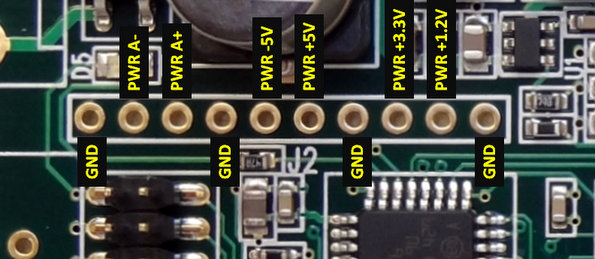
The analog power: PWR A- and PWR A+ depends on your input voltage. For a DC value of 12V you will see approximately 11V because of the voltage drop in the bridge rectifier.
SOFTWARE INTERFACE
Like many modern DACs, the dam1021 has a software interface. You can control the DAC with a micro-controller or a PC, update the firmware and upload custom digital filters.
In most DACs, the communication protocol with the DAC is I2C. In this DAC is serial communication. The dam1021 has two serial interfaces:
- Noise isolated TTL-level serial (not enabled as of this writing)
- RS232 serial (enabled with first release)
Communicating with RS232 Interface
Also check dimdim’s blog which has an excellent writeup on the RS232 interface [link]. Here I document my own experience with the interface.
You need:
- PC serial port
- Or a USB to RS232 interface cable capable of supporting 115,200 baud
- Note: The serial port transceiver on the dam1021 R-2R DAC has power savings enabled, to reduce noise. It needs valid RS-232 level on the RXD line to power up. If your USB-Serial dongle also have power saving then you have a problem. [1176]
- Terminal program
Hardware connection
Connect the RS232 pins to the PC serial port as follows. This is basically a null-modem connection without h/w flow control. You may want to check this informative site on serial communications including RS232 [link]
I made a simple 4-feet cable with 2 twisted pairs of cat-5 wires.
Notice the pins in the board can also be numbered 1-5 counting from the top right in the photo. So pin 2 in the PC serial port goes to pin 3 in the DAC, pin 3 to pin 2 and pin 5 to pin 5.

One can interface with the DAC in two modes:
- Interactive by invoking the “uManager” and using a terminal application
- Non-interactive by sending messages to the DAC through the serial port (with or without a terminal application)
Using Terminal Application (Tera Term)
The terminal program must support xmodem file transfer protocol. Putty is a very popular terminal program but does not support xmodem. “ExtraPutty” is an offshoot of Putty and supports xmodem, but it requires .NET but I didn’t want to download .NET. I ended up selecting “Tera Term”. Check the use of ExtraPutty in dimdim’s post [link]
Download Tera Term from [link]
After downloading and extracting all the files, launch the application “ttermpro”

After launching Tera Term, select “Serial” and select the Port you are using to communicate with the DAC.
Configure the serial communication parameters with:
- Baud rate: 115,200 (This is pretty fast. Use a good, short cable)
- Data bits: 8
- Stop bits: 1
- Parity: none
- Flow control: none
Click on the “Setup” pull-down menu and select “Serial port”
Invoking “uManager” for Interactive Mode
Type “+++” and wait for the DAC to respond (~1 sec). You must enter “+++”, otherwise there will be no response. If you enter anything else, there will also be no response. “+++” invokes the “uManager” enabling interactive communication with the DAC through a terminal window. The DAC also responds to commands sent through the serial interface (more of that later)
The dam1021 will respond with the following screen. Notice the original firmware is “FPGA Rev 0.8”

Typing “?” returns a list of available commands
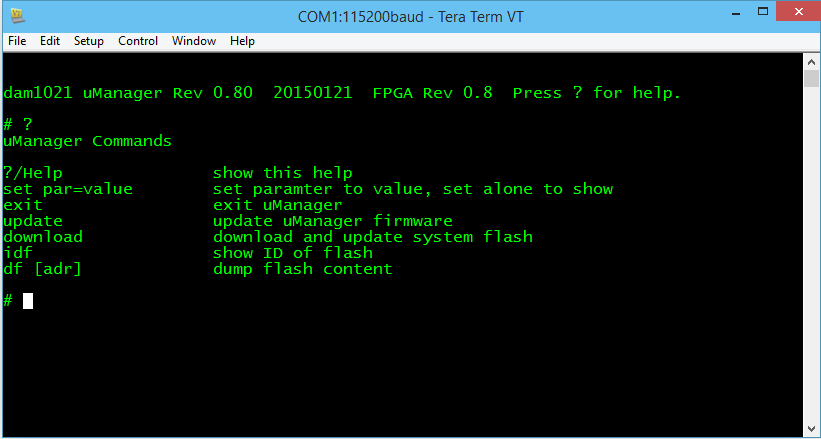
Updating the firmware
First download the firmware from [1116] and unzip it (it is a “SKR” file):

Type “download” in the terminal window. The DAC will acknowledge your command and wait for you to start the xmodem transfer.
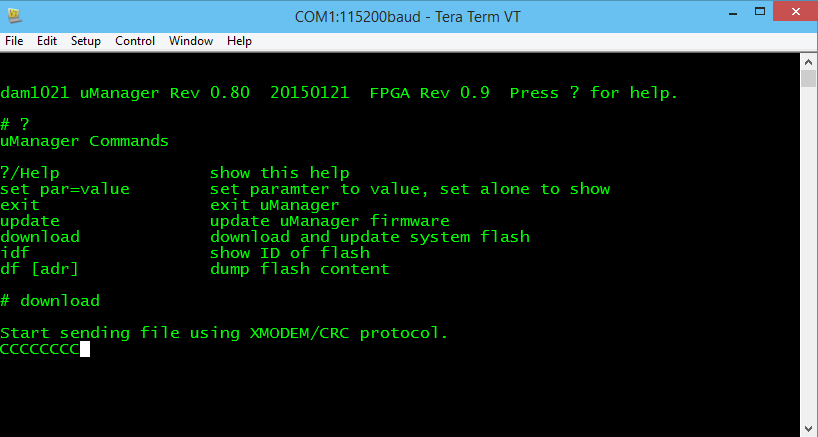
In the “File” pull down menu select “Transfer” -> “Xmodem” -> “Send” and you will see the XMODEM send dialog box. Select the file you downloaded and click “Open”

The file will start transferring and you can see progress in the progress bar.

After completion, [optional – type “exit” in the terminal window] power cycle the DAC. Type “+++” in the terminal window and wait (~1 sec). You will see the following screen. Notice that the firmware version is now 0.9

Non Interactive Commands
You may send commands to the DAC through the terminal application but without invoking the “uManager”. If you are in uManager, type “exit” to exit uManager. The DAC is then ready to receive messages/commands.
UPLOADING DIGITAL FILTERS
Now that we know how to update the firmware, uploading digital filters uses the same procedure. Lots of filters have been crafted by users in the diyaudio filter brewing thread [link]. Filter files ready to be uploaded are binary files. The filter text files cannot be uploaded. They need to be converted to binary format with the “filter tools” provided by Soren [link]
The procedure for uploading a filter file is hereby summarized:
- After invoking the uManager, type “download” in the terminal window. The DAC will acknowledge your command and wait for you to start the xmodem transfer
- In the “File” pull down menu select “Transfer” -> “Xmodem” -> “Send”. You will see the XMODEM send dialog box. Select the filter file you wish to upload and click “Open”
- After completion, power-cycle the DAC. Note: changing the input or changing a track with a different sample rate also triggers reloading of the filters
MASTER CLOCK OUTPUT
Ref: [848]
- I2S MCLK OUT pin: Master clock output: 45.1584 and 49.152 Mhz (which can also be divided)
- I2S FSEL IN pin: Input signal at this pin selects between 45.1584 MHz and 49.152 MHz master clock output
Although not advertised as working with the initial firmware, it has been reported to be fully working as indicated above. [link]
MY OTHER POSTS ON THIS DAC
| TITLE | SUBJECT |
LINK |
DESCRIPTION |
| Soekris dam 1021 R-2R DAC ILLUSTRATED GUIDE | Users Manual | [link] | Users manual for the Soekris DAC. |
| Soekris dam1021 Build | Build Guide | [link] | Details of my initial build of the Soekris DAC. |
| dam1021 R-2R DAC MODs | Mods | [link] | Mods I have performed on the DAC build. |
| dam1021 R2R More Mods | Mods | [link] | Later mods on the DAC build. |
| Digital Filters for Soekris R2R DAC | Digital Filters | [link] | Extensive list of DIY filters from the diyaudio filter brewing forum thread. |
| R2R Benchmark Filters (for now) | Digital Filters | [link] | Latest set of filters developed and shared in the diyaudio filter brewing forum thread. The best filters of the bunch. |
| R-2R DAC For The REST of US | Technical Details | [link] | Introductory post describing the innovations and capabilities implemented in this DAC. |
| The Soekris R-2R DAC: Technical Details | Technical Details | [link] | Additional technical details of the Soekris DAC that were not covered in the post above and collected after I had the DAC on my hands. |
BBB DAC DEVELOPMENTS
As many know, the BeagleBone Black I2S audio implementation is in a way superior to the I2S audio implementation of the Raspberry Pi primarily because the audio clocks can be derived from the on-board 24.576MHz clock and also through off board oscillators through an I/O pin. It its current implementation, the BBB supports the 48KHz family of sample rates with the on-board oscillator and can support the 44.1KHz family of sample rates with an off-board oscillator.
The current method of generating the clocks for digital audio in the Raspberry Pi are far from perfect. The best clocks are obtained by integer division of the on-board 19.2 MHz clock and works for 48K and 96K sample rates and only if the DAC can accept 40fs or 80fs. For anything else, the clocks are derived from the 500MHz PLL through fractional division as explained above. It has been reported that the 500MHz clock itself is derived from the on-board 19.2MHz clock through a clock multiplier.
Even with a “superior” audio clock implementation, I2S DAC development for the BBB has been painfully lagging that of the Raspberry Pi (so painful that there are no products shipping). The reason is because that there is a lot, lot more community development in the Pi than the Beagle. The RPi has just shipped its 5 millionth device [link] whereas the BBB has only shipped about 220K devices [link].
No longer.
TWISTEDPAIR AUDIO
Twistedpair Audio has been busy designing and testing external components to allow the BBB access to lower jitter off-board oscillators and data reclocking for ultimate I2S signal fidelity. These boards are almost ready for general sale [link]
Update 3/26/15: they are available for sale [link], and pretty reasonably priced given the components. (The store says “introductory pricing” though)
The mockup photo below shows (from right to left) BBB, “Hermes”, “Cronus”, and Buffalo III DAC. The board on the top is the Hermes board for the Amanero interface. With Hermes-Cronus, Amanero can use better off-board clocks if so desired.

These links explain the functionality of these boards [link], [link]
- BBB as the source of I2S/DSD digital audio, it needs external clocks in order to support all sample rates
- Hermes as the two-way signal isolator (clock signal into BBB, audio data signals out of BBB, and I2C in-out) and I2S/DSD switch. Hermes also has connections for a volume pot, push buttons, etc. that interfaces to I/O pins in the BBB -more details below (priced at $40 or $16 for the board only)
- Cronus is the clock board which can accommodate two clocks: one for 44.1KHz sample rate family and one for 48kHz sample rate family. Cronus also provides data realigning of the I2S signals (as opposed to FIFO reclocking) – more details below. (Priced at $50)
- Clock modules. The clock modules are available separately from the Cronus board with a choice of frequencies and are priced at $35 each. You need two.
- Total is $160 for Hermes+Cronus+Clocks. You don’t really need the Hermes if all you are interested in are the clocks, so the minimum investment is $120
Here is a photo of the updated Hermes board (the interface/isolator board between BBB and Cronus)

- Provides isolation for audio signals with 1 -8 channels of PCM – 1 – 4 channels of DSD output
- Provides I2C isolation
- SPDIF output is possible.
- Lots of headers: for Switches/Rotary encoder and drivers for indicator LEDs; USART header, ADC header for analog control; headers for external power/reset switches.
- Prototyping area (for fun!)
- Provision for backup battery to protect the BBB on shutdown by providing a soft shutdown(self regulating battery not included in the kit – but very easy/cheap to obtain).
Here is a photo of the updated Cronus

- Ultra low noise low impedance power supply for clocks (adm7150)
- A clock selection multiplexer to switch between 44.1 and 48Khz time bases (this means the source must output a clock selection signal). The clocks are isolated from each-other and the rest of the circuit by utilizing L/C filtering
- A selectable/bypassable ultra low phase noise clock divider to supply 1:2 or 1:4 clocks to a source
- A synchronous reclocker that re-clocks the audio from the source back to the master clock. This brings all signals back into alignment with the actual master clock regardless of source jitter. Uses Potato Semi flip-flops. To learn more, here is my crude attempt at reclocking [link]
- SMA and uFL connectors for external clock signals (both in or out), uFL connectors for PCM/DSD output.
IQAUDIO
IQAudio’s main products to date are audio boards for the Raspberry Pi. As I wrote here [link] their DAC board is one of my favorite for the Raspberry Pi. The DAC boards for the RPi are also very popular, often sold out at the Tindie store [link]
The IQAudio BBB DAC is aimed at a full I2S DAC solution for the Beagle. A photo of a prototype is shown below.As can be seen in the photo, there are no external clocks that can be fed to the BBB. Normally a DAC operates in Slave Mode. The DAC locks to the master clock or bit clock of the source and receives the data from the source device. In the IQAudio solution, the DAC instead is running in Master mode. The DAC generates the appropriate bit-clock frequencies in accordance to the sample rate of the track being played and it “pulls” the data from the BBB. You may follow its development here [link].
According the manufacturer, the board will be available in May at a target price of $45-$60. Please send your queries and comments to IQaudio at Gordon@iqaudio.com.
Notice also the I2S headers. Possibly you can use this board and tap the I2S signals and use them for another DAC board.

Comparing with the RPi DAC which is shown below, it seems the BBB DAC uses almost the same components. The innovations are in software: drivers in the BBB side and firmware to setup and control the DAC chip.

There is also an advantage of buying a product from iQAudio (and other similar companies such as HifiBerry) in that they invest in software development (drivers) and provide many ready-to-run software distributions for your embedded computer.
ACKO SUPERCAPE
Acko is also planning to release a BBB cape that is derived from their current clock/isolator board which is already a working solution for the BBB. A nice photo from this post [1828]:

The “supercape” adds battery management to the capabilities of the current clock board in an integrated package. It will provide:
- UPS kicks in when external power is removed. On-board PWR_MON will continue to power the BBB (~1hr) or options to safely shutdown BBB immediately. Same shutdown action if battery level goes below operational level [1088]
- High Speed Galvanic Isolation with -Synchronous or Asynchronous re-clocking.capability
- Ultra-low jitter Dual Synchronous Audio Clock (98.304MHz/90.3168MHz or 49.152MHz/45.1584MHz options) – Master Clock
- All buffered outputs with high drive capability
- GHz rated switching components
The following diagrams show the work-in-progress for this cape, starting with adding a USP and interface for the BBB and the clock board to the current configuration of a fully integrated cape.
From: [1088]

[1332]

From [1587]:

SOEKRIS dam1021 DAC
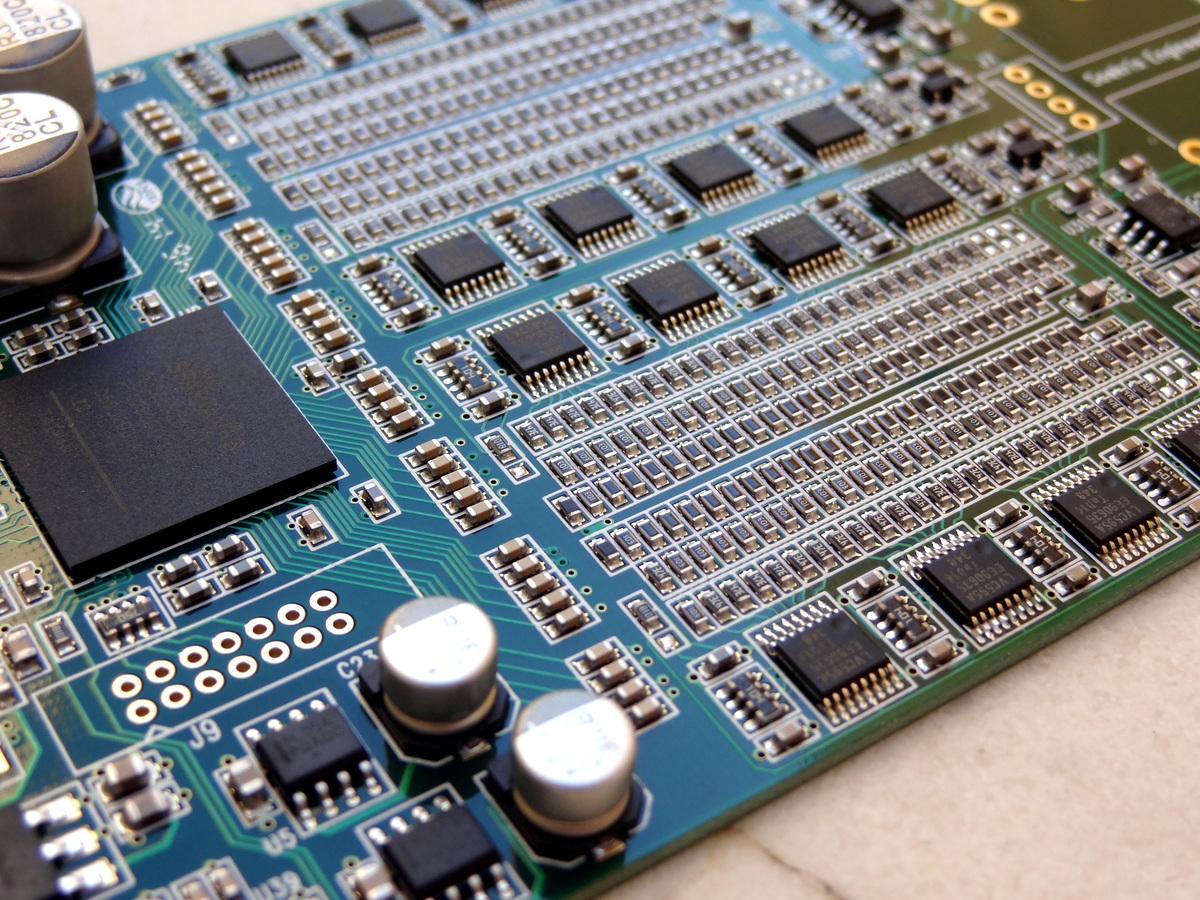
The Soekris R2R DAC supports the BBB in synchronous slave mode by providing the required master clock frequency as selected by the BBB. BBB is in master mode, but the DAC provides the clock
- I2S MCLK OUT pin: Master clock output: 45.1584 and 49.152 Mhz (which can also be divided)
- I2S FSEL IN pin: Input signal at this pin selects between 45.1584 MHz and 49.152 MHz master clock output
It works in a similar fashion as the TwistedPair and Acko solutions but it has been incorporated into the DAC.
I have yet to experiment with it myself but has been reported to work: [link]
 H i F i D U I N O
Latest Comments